
IGNOU Exam Admit Card: Complete Guide to Download, Instructions, Eligibility, and Important Updates

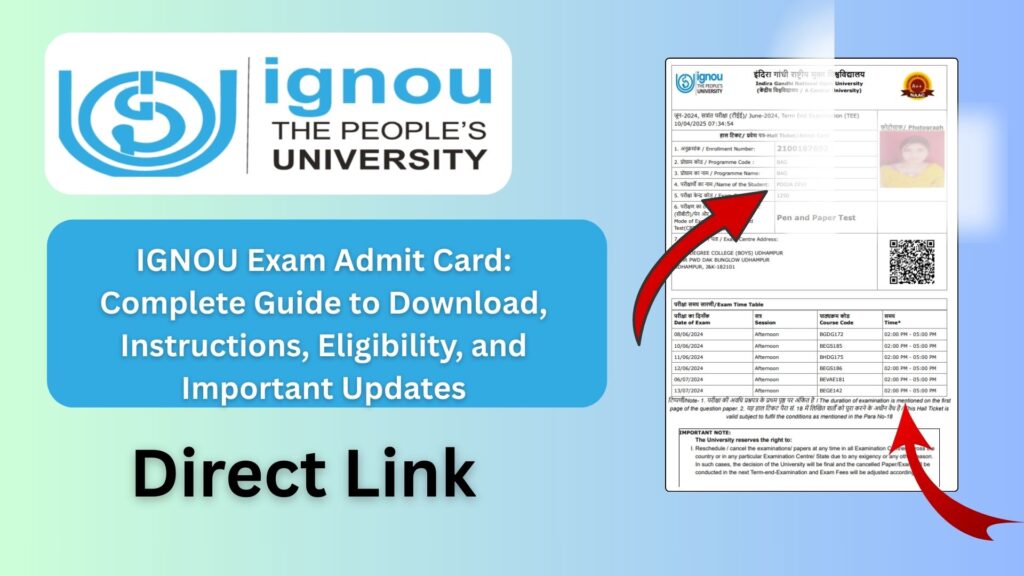
IGNOU Exam Admit Card: The Indira Gandhi National Open University (IGNOU) conducts the Term-End Examinations (TEE) twice every year, usually in June and December. For every examination cycle, the university releases the IGNOU Exam Admit Card for all eligible students enrolled in various undergraduate, postgraduate, diploma, and certificate programs. The admit card is an essential document for appearing in the exam and contains vital information such as the student’s exam center, date, time, and course codes.
If you are an IGNOU student preparing for Term-End Exams, downloading your admit card is the most crucial step before appearing in the examination hall. In this article, you will find a detailed explanation of how to download the IGNOU Admit Card, important instructions, exam guidelines, eligibility criteria, troubleshooting tips, frequently asked questions, and a complete table of important links.

To download the IGNOU Exam Admit Card, visit:
Download IGNOU Admit Card: https://ignou.samarth.edu.in/
What Is the IGNOU Exam Admit Card?
The IGNOU Exam Admit Card, also known as the Hall Ticket, is an official document issued by the university that authorizes a student to appear for the Term-End Examination. It is issued for every exam cycle and contains all the key details needed for the exam, including the student’s name, enrollment number, course codes, exam center address, timing, exam session, and important instructions.
The admit card is mandatory for entry into the examination center. Students without the admit card are not allowed to sit for the exam under any circumstances. It also serves as proof that the student has successfully submitted their assignments (if required) and is eligible to write the exam.
Importance of the IGNOU Exam Admit Card
The admit card holds great importance for IGNOU students for several reasons:
Proof of Exam Eligibility
It confirms that the student meets all the requirements to appear for the exam, including valid registration and assignment submission (for applicable courses).
Exam Center Information
The allotted exam center, address, and center code are clearly mentioned.
Exam Schedule Details
It lists all course codes, dates, and timings of your TEE.
Mandatory Document
Students must carry the admit card along with a valid ID proof.
Helps in Exam Planning
Knowing the schedule in advance allows students to prepare subject-wise.
When Does IGNOU Release the Exam Admit Card?
IGNOU generally releases the admit card 7–15 days before the examination starts. However, in some cycles, it may be released slightly earlier or closer to the exam date.
Students are advised to check the official portal every few days once the exam month approaches.
How to Download IGNOU Exam Admit Card?
Students can download their admit card easily through the official portal. Follow the detailed steps below.
Step 1: Visit the Official Link
Open the official portal provided below:
IGNOU Admit Card Download Link: https://ignou.samarth.edu.in/
Step 2: Login to the Student Portal
Use your enrollment number and password to log in.
Step 3: Go to the Hall Ticket Section
On the dashboard or exam section, you will find the link to download the admit card.
Step 4: Enter Required Details
Sometimes the system may ask for:
- Enrollment number
- Program code
Fill the required details.
Step 5: Submit and Download
Your admit card will appear on screen.
Download it and take multiple printouts for safety.
What Details Are Mentioned on the IGNOU Admit Card?
A standard IGNOU admit card includes the following important details:
- Student’s Name
- Enrollment Number
- Program Code
- Exam Centre Code
- Exam Centre Address
- Session Year and Exam Month
- Course Codes Registered for TEE
- Exam Date and Time
- Important Exam Instructions
- Photograph and Signature (varies by cycle)
These details are crucial, so students should verify each point immediately after downloading the admit card.
What to Do If There Is an Error in the Admit Card?
Sometimes, mistakes may appear in the admit card. Here are common errors and what to do:
1. Incorrect Name
Contact your regional centre immediately with your ID proof.
2. Wrong Course Code
Verify your exam form submission. If it exists, inform your regional centre.
3. Wrong Exam Centre
Send a request for correction if time permits (correction depends on IGNOU rules).
4. Missing Photograph
Carry a passport-size photo and government ID to the exam centre.
5. Unable to Download
Check your enrollment number and server status.
Eligibility for Getting the IGNOU Admit Card
Students must fulfill certain criteria to receive the admit card:
1. Valid Registration
Your admission must be active for the session.
2. Assignment Submission
For most programs, assignments must be submitted before exams.
3. Exam Form Submission
You must have filled the examination form correctly.
4. No Pending Fees
Ensure no pending dues exist in your student account.
If any of the above conditions are not met, the admit card may not be generated.
IGNOU Term-End Exam (TEE) Guidelines
IGNOU strictly follows certain examination guidelines. Students must understand these before appearing for the exam.
1. Carry Printout of Admit Card
Soft copies are not allowed.
2. Carry Valid Government ID
You can carry:
- Aadhaar Card
- Voter ID
- Passport
- Driving License
3. Reach the Centre Early
Reach at least 30 minutes before the exam starts.
4. Follow Seating Plan
Find your seat based on your enrollment number.
5. No Electronic Devices
Mobile phones, smartwatches, or calculators (unless allowed for specific subjects) are strictly prohibited.
6. Write Enrollment Number Correctly
This is mandatory on every answer sheet.
7. Follow Invigilator Instructions
Any violation may result in disqualification.
How to Check Exam Centre Details Before the Exam?
Many students want to know their exam centre before downloading the admit card. You can check:
- City preference while submitting exam form
- Centre code in registration info
However, the final centre is displayed only on the admit card.
Students must rely on the admit card for final confirmation.
Important Tips to Avoid Problems During the Exam
- Print multiple copies of your admit card.
- Keep your enrollment number written on a paper for safety.
- Visit the exam center one day before the exam, especially if unfamiliar.
- Prepare all stationery the previous night.
- Keep assignments and coursework updated for future TEEs.
Important IGNOU Links and Information
| Purpose | Official Link |
|---|---|
| Download Admit Card | https://ignou.samarth.edu.in/ |
| IGNOU Admission | https://ignouadmission.samarth.edu.in/ |
| Assignment Status | https://admission.ignou.ac.in/changeadmdata/StatusAssignment.ASP |
| Grade Card | https://gradecard.ignou.ac.in/ |
| Admission Status | https://isms.ignou.ac.in/changeadmdata/AdmissionStatusNew.ASP |
| Re-Registration | https://onlinerr.ignou.ac.in/ |
| Official IGNOU Website | https://ignou.ac.in/ |
Common Problems Students Face with IGNOU Admit Cards
1. Admit Card Not Showing
This usually means:
- Exam form not submitted
- Assignment not updated
- Incorrect enrollment number
2. Wrong Centre Location
Rare, but can happen due to seat availability.
3. Admit Card Not Downloading
High server load during peak times.
4. Missing Courses
Check if you included the course in the exam form.
How to Fix Admit Card Download Issues?
Here are some practical solutions:
- Use a different browser.
- Clear browser cache.
- Try downloading during non-peak hours.
- Check enrollment number accuracy.
- Contact your regional centre if issue persists.
Why IGNOU Exams Are Important for Students?
IGNOU exams play a crucial role in evaluating academic performance. Students must pass both:
- Assignments
- Term-End Exams
to complete their courses successfully.
Failing an exam requires reappearing in the next TEE cycle.
Thus, downloading the admit card on time and preparing properly is essential.
FAQ about IGNOU Exam Admit Card
Where can I download the IGNOU Admit Card?
You can download it from:
https://ignou.samarth.edu.in/
When is the admit card released?
It is released 7–15 days before the Term-End Exam.
Is the admit card mandatory for TEE?
Yes, it is compulsory.
Can I appear in the exam without a government ID?
No, you must carry a valid ID proof.
My admit card is not showing. What should I do?
Check if:
You submitted the exam form
Your assignments are submitted
Enrollment number is correct
Can I change my exam centre after admit card is issued?
Generally, no changes are allowed.
My course code is missing. What does it mean?
You may not have filled the exam form for that course.
Does the admit card include photo and signature?
Sometimes it does, depending on the cycle.
Can I laminate my admit card?
Yes, but carry a backup copy.
What if I lose my admit card?
Download and print again from the portal.
Conclusion
The IGNOU Exam Admit Card is one of the most essential documents for students appearing in the Term-End Examination. It not only serves as proof of exam eligibility but also provides crucial details like exam center, schedule, and course codes. Students should download their admit card on time, verify all the details, and follow exam guidelines to avoid any last-minute issues.
Using the official portal at https://ignou.samarth.edu.in/ makes the process simple and quick. Always ensure that your assignments are submitted and your exam form is filled correctly so that your hall ticket is generated without problems.
A well-prepared student, along with proper documentation, is always ready for a smooth examination experience.