
IGNOU Admission Status 2025: Complete Guide to Check Your Admission Status Online

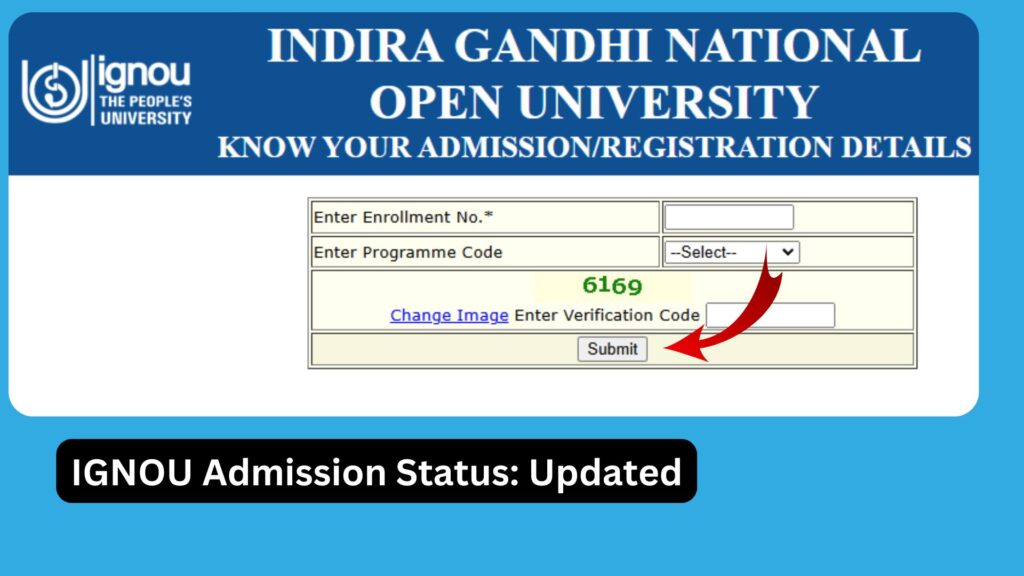
IGNOU Admission Status 2025: Indira Gandhi National Open University (IGNOU) is one of the largest and most popular distance-learning institutions in the world. Every year, lakhs of students apply for admission to various undergraduate, postgraduate, diploma, and certificate programs. After completing the application process, the most important step for every student is to check the IGNOU admission status to ensure that their form has been accepted and their enrollment is confirmed.
IGNOU updates the admission status online for all students who apply through the Samarth Portal or through the older admission platforms. Whether you have taken admission in the January session or the July session, monitoring your admission status is essential to avoid any delays in receiving study material, ID cards, assignments, and attending exams.

This detailed article explains everything you need to know about the IGNOU Admission Status 2025, including how to check your status, reasons for delays, what to do if your admission is not confirmed, important guidelines, and more.
What Is IGNOU Admission Status?
IGNOU Admission Status is an online facility that helps students check whether their admission application has been approved by the university. Once a student completes the application, uploads the documents, and makes the payment, the university verifies all the submitted information.
The admission status reflects:
• Whether the admission has been approved
• Whether the admission is under verification
• Whether the admission has been rejected
• Whether additional documents are required
After your admission is confirmed, the system generates an enrollment number, which is the most important identity number for every IGNOU student. This number is required for checking grade cards, downloading the ID card, submitting assignments, and appearing for term-end examinations.
Why Checking IGNOU Admission Status Is Important?
Many students apply for IGNOU admission but do not follow up afterward. Failing to verify your admission status can lead to delays in:
• Receiving study materials
• Getting your enrollment number
• Accessing the student portal
• Downloading the ID card
• Submitting assignments
• Appearing for exams
Checking admission status helps students identify issues early and resolve them before deadlines.
Some of the major reasons students should regularly check their IGNOU admission status include:
1. Verification of Documents
IGNOU strictly verifies documents like mark sheets, identity proof, photographs, category certificates, and experience certificates (if applicable). If any issue is found, the admission may remain pending until the student uploads correct documents.
2. Payment Verification
Sometimes online payments do not reflect instantly. Students may need to recheck or raise a grievance if the admission fee has been deducted but not updated in the system.
3. Enrollment Number Update
The enrollment number is crucial for accessing the student dashboard. Students must check the admission status to get the enrollment number as soon as it is generated.
4. Confirmation of Course Details
Students can confirm whether the course, medium, and study centre selected during admission are correctly updated in the system.
5. Avoiding Delays in Academic Activities
Assignment submissions, exam form submissions, and study material dispatch all depend on confirmed admission. Hence checking the status regularly is essential.
How to Check IGNOU Admission Status 2025?
IGNOU provides an online portal for students to check their admission status in just a few steps. Follow the instructions below:
Step 1:
Visit the official IGNOU Admission Status portal:
https://isms.ignou.ac.in/changeadmdata/AdmissionStatusNew.ASP
Step 2:
Enter your:
• Control Number (generated during the admission process)
or
• Enrollment Number (if already assigned)
Step 3:
Enter your Date of Birth.
Step 4:
Click on the Submit button.
Step 5:
Your complete admission status will appear on the screen, including:
• Enrollment Number
• Course Details
• Regional Centre
• Study Centre
• Admission Approval Status
• Remarks from Verification Team
If your admission is approved, you will be able to proceed to the next steps such as downloading your ID card, receiving study material, and accessing the student portal.
IGNOU Admission Status: Meaning of Different Messages
When checking your admission status, you may see different types of messages. Here is what they mean:
1. Admission Confirmed
Your admission has been approved and your enrollment number has been generated. You can now access all IGNOU facilities.
2. Admission Under Verification
This means your documents or application details are being reviewed. It usually takes 7–14 working days.
3. Admission Rejected
Your application has been denied due to incomplete or incorrect documents. You may need to reapply.
4. Documents Pending
IGNOU requires additional or corrected documents. Upload them as soon as possible to avoid rejection.
5. Payment Not Verified
Your payment has not been updated in the system. You may need to contact support or raise a grievance.
6. Enrollment Number Not Generated
Admissions may be approved but enrollment numbers not yet assigned. This usually updates after a few days.
Common Reasons for IGNOU Admission Status Delays
Many students face delays in their admission confirmation due to several reasons, including:
1. Incorrect or Blurry Document Uploads
IGNOU requires documents in clear, readable formats. Blurry documents often cause delays.
2. Payment Failure or Pending Status
If the fee payment is not reflected, the admission cannot be processed.
3. Huge Volume of Applications
During peak months (January and July), the verification process may take longer.
4. Mismatch in Personal Details
If your name or details do not match across documents, verification may be delayed.
5. Technical Issues in the Portal
Sometimes IGNOU servers experience downtime leading to delayed updates.
What to Do If IGNOU Admission Status Is Not Updated?
If your admission status has not been updated even after waiting 10–15 days, follow these steps:
1. Check Your Email
IGNOU may send verification-related instructions.
2. Re-login and Check Again
Sometimes updates take time to reflect.
3. Contact Your Regional Centre
They can verify whether your documents have been approved.
4. Raise a Grievance
You can raise a complaint through the IGNOU grievance portal.
5. Wait During High-Peak Season
If you applied close to the deadline, delays are normal.
6. Keep Copies of All Documents
These may be needed for re-uploading or verification later.
Important Links for IGNOU Admission Status
Below is a table containing crucial links related to IGNOU admission, status check, and supporting portals.
| Purpose | Link |
|---|---|
| Check IGNOU Admission Status | https://isms.ignou.ac.in/changeadmdata/AdmissionStatusNew.ASP |
| IGNOU Student Login (Samarth Portal) | https://ignou.samarth.edu.in/ |
| IGNOU Assignment Submission Status | https://isms.ignou.ac.in/changeadmdata/StatusAssignment.asp |
| IGNOU Re-Registration Portal | https://onlinerr.ignou.ac.in/ |
| IGNOU Exam Form Submission | https://exam.ignou.ac.in/ |
| IGNOU Student Support Portal (iGRAM) | https://igram.ignou.ac.in/ |
Steps After IGNOU Admission Is Confirmed
Once your admission status shows Approved, you must complete the following steps:
1. Download the IGNOU ID Card
Log in to the Samarth portal and download your digital student ID card.
2. Access the Student Dashboard
You can now view your profile, course details, and study centre information.
3. Download Study Material
Study materials are available on the eGyankosh platform.
4. Check Assignment Question Papers
Assignments are mandatory for all subjects.
5. Submit Assignments on Time
Assignments contribute to your final grade.
6. Apply for Term-End Exams
You can apply once the exam form is available.
7. Track Study Material Dispatch
Printed material may also be sent to your address if applicable.
IGNOU Admission Status for Freshers vs. Re-Registration
There is a difference between checking admission status for fresh admission and re-registration.
Fresh Admission
Freshers must check the status through the Admission Status portal using their control number.
Re-Registration
Re-registered students usually receive an updated course list directly on the student dashboard.
Tips for Students to Avoid Admission Issues
To ensure a smooth admission process, follow these tips:
• Upload documents clearly and correctly
• Use a valid and active mobile number and email ID
• Keep a copy of your control number
• Ensure name and personal details match across all documents
• Pay the admission fee only through official links
• Do not wait until the deadline to apply
FAQ about IGNOU Admission Status 2025
How long does IGNOU take to confirm admission?
Usually, IGNOU takes 7–15 days to verify applications. During peak admission season, it may take longer.
What is a Control Number in IGNOU?
The control number is generated after you submit your admission form. It is used to track the status of your application.
How do I know if my admission is rejected?
Your status will show as “Rejected” along with the reason. You may reapply for the next session.
Can I change my study centre after admission?
Yes, but you must apply through the student portal or contact your regional centre.
Will I receive an enrollment number after admission approval?
Yes. Your enrollment number will be generated once your admission is approved.
What should I do if my payment is successful but not updated?
Contact IGNOU support or raise a grievance through the student support portal.
Can I download my ID card without confirmed admission?
No, you can download your ID card only after your enrollment number is generated.
Where can I check my assignment submission status?
You can check it using the official link: https://isms.ignou.ac.in/changeadmdata/StatusAssignment.asp
Conclusion
Checking your IGNOU Admission Status 2025 is one of the most crucial steps after applying for admission. It ensures that your application has been approved, your documents are verified, and your enrollment number is generated. The process is simple, fast, and completely online through the official IGNOU admission status portal.
Always keep track of your admission progress to avoid any delays in downloading study materials, submitting assignments, or appearing for exams. With the right information and regular monitoring, students can ensure a smooth academic journey with IGNOU.
If you have applied for admission recently, use the official link below to check your status:
Check IGNOU Admission Status:
https://isms.ignou.ac.in/changeadmdata/AdmissionStatusNew.ASP