
IGNOU Assignment Front Page: Complete Guide, Format, Download, and Instructions

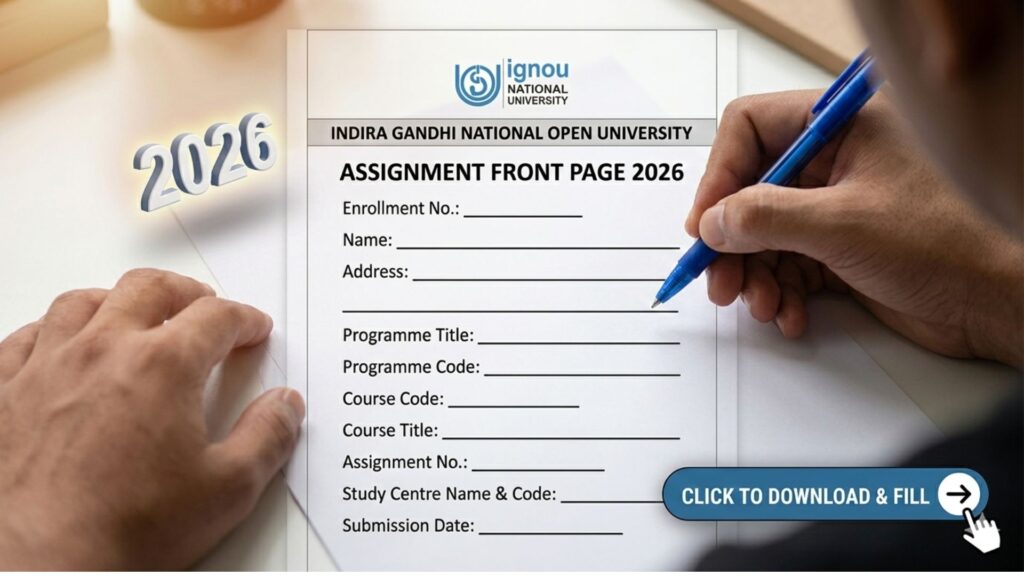
The IGNOU assignment front page is one of the most important components of your assignment submission. Whether you are a student of undergraduate, postgraduate, diploma, or certificate programs, attaching a properly filled front page is mandatory. Many students overlook its importance, but even a well-written assignment can be rejected if the front page is missing or incorrect.

In this comprehensive guide, you will learn everything about the IGNOU assignment front page, including its format, importance, how to fill it correctly, common mistakes, and download instructions.
What is IGNOU Assignment Front Page?
The IGNOU assignment front page, also known as the assignment cover page, is the first page attached to your assignment. It contains essential details about the student and the course, helping evaluators identify the assignment correctly.
This page acts as an identification sheet and ensures that your assignment is properly recorded, evaluated, and credited to your academic record.
Importance of IGNOU Assignment Front Page
The front page is not just a formality. It plays a crucial role in the assignment evaluation process.
Key Reasons Why It is Important:
- Student Identification
It clearly shows your name, enrollment number, and course details. - Avoids Misplacement
Proper labeling ensures your assignment does not get lost. - Mandatory Requirement
IGNOU requires every assignment to include a front page. - Proper Evaluation
Helps evaluators assign marks to the correct student. - Professional Presentation
Makes your assignment look organized and complete.
IGNOU Assignment Front Page Download
Students can download the ready-made front page template from the official resource below: https://www.bookhouseadda.com/ignou-assignment-front-page/
The template is available in PDF and Word formats and includes all required fields as per IGNOU guidelines.
Details Required on IGNOU Assignment Front Page
Every assignment front page must include specific information. Missing or incorrect details can lead to rejection.
Mandatory Fields:
| Field Name | Description |
|---|---|
| Student Name | Full name as per IGNOU records |
| Enrollment Number | Unique student ID |
| Program Code | Course program (e.g., BAG, MBA) |
| Course Code | Subject code |
| Study Centre Code | Assigned study center |
| Regional Centre | Your regional IGNOU center |
| Mobile Number | Active contact number |
| Email ID | Valid email address |
| Session | January or July session |
| Course Title | Name of subject |
| Assignment Number | Assignment serial |
| Date of Submission | Actual submission date |
| Signature | Student’s signature |
These details ensure accurate tracking and evaluation of your assignment.
How to Download IGNOU Assignment Front Page?
Follow these simple steps:
- Visit the download link:
https://www.bookhouseadda.com/ignou-assignment-front-page/ - Choose file format (PDF or Word)
- Download the file
- Print on A4 size paper
- Fill all details carefully
- Attach to your assignment
How to Fill IGNOU Assignment Front Page?
Filling the front page correctly is very important.
Step-by-Step Guide:
- Write your name in capital letters
- Enter correct enrollment number
- Fill program and course code accurately
- Mention study centre and regional centre
- Add contact details
- Write session (January/July)
- Enter submission date
- Sign at the bottom
Ensure all details are clearly written and legible.
Format and Layout of IGNOU Front Page
The front page follows a standard format:
- University Name at top
- Assignment title
- Student details
- Course details
- Signature and date
Maintaining proper format ensures acceptance and avoids confusion.
Guidelines for Writing Front Page
To ensure your front page is accepted:
- Use A4 size paper
- Write neatly in blue or black pen
- Avoid overwriting
- Use capital letters for important fields
- Do not leave any field blank
- Keep it clean and professional
How to Attach Front Page to Assignment?
Follow this correct sequence:
- Front Page
- ID Card Copy (if required)
- Question Paper
- Answer Sheets
This structured order helps evaluators review your assignment easily.
IGNOU Assignment Submission Tips
- Prepare assignments on time
- Use proper format
- Double-check all details
- Keep photocopies of submission
- Follow study centre guidelines
Common Mistakes to Avoid
Students often make mistakes that can affect evaluation.
Avoid These Errors:
- Missing front page
- Wrong enrollment number
- Incorrect course code
- Illegible handwriting
- Submitting without signature
- Using wrong session
Such mistakes can delay or even cancel evaluation.
Can You Create Your Own Front Page?
While you can create your own front page, it is always recommended to use the official format to avoid rejection.
IGNOU Assignment Front Page for Different Programs
The same format is used for:
- Bachelor Programs (BAG, BCOMG)
- Master Programs (MA, MBA)
- Diploma Courses
- Certificate Courses
Each assignment must have a separate front page.
Is Front Page Required for Online Submission?
Yes, even for online submission:
- Scan the front page
- Attach it as first page in PDF
- Upload complete assignment
Importance in Evaluation Process
The front page ensures:
- Correct assignment tracking
- Proper marking
- Avoiding confusion
Without it, your assignment may not be evaluated.
FAQ about IGNOU Assignment Front Page
Is IGNOU assignment front page mandatory?
Yes, it is compulsory for every assignment submission.
Where can I download the front page?
You can download it from:
https://www.bookhouseadda.com/ignou-assignment-front-page/
Can I submit assignment without front page?
No, assignments without front page may be rejected.
Should I fill front page by hand?
Yes, it is recommended to fill it using blue or black pen.
Do I need separate front page for each subject?
Yes, each course requires a separate front page.
Can I type the front page?
Handwritten is preferred unless otherwise specified.
What happens if details are wrong?
It may lead to incorrect evaluation or rejection.
Is front page required for online submission?
Yes, it must be included in scanned PDF.
What paper should I use?
Use A4 size paper only.
Can I reuse same front page?
No, each assignment needs a separate one.
Conclusion
The IGNOU assignment front page is a crucial part of your academic submission. It acts as the identity of your assignment and ensures that your work is evaluated correctly and efficiently. Even a small mistake in the front page can lead to delays or rejection, so it is important to fill it carefully and accurately.
Students should always use the official format, provide correct details, and attach the front page properly to each assignment. Whether submitting online or offline, including a properly filled front page is mandatory.
To make the process easier, you can download the ready-made template from the link below:
https://www.bookhouseadda.com/ignou-assignment-front-page/
By following this complete guide, you can ensure that your assignments are accepted without any issues and evaluated on time. Proper presentation, accurate information, and timely submission will help you achieve better academic results in IGNOU.