
IGNOU Assignment Status 2026: Complete Guide to Check Submission and Marks

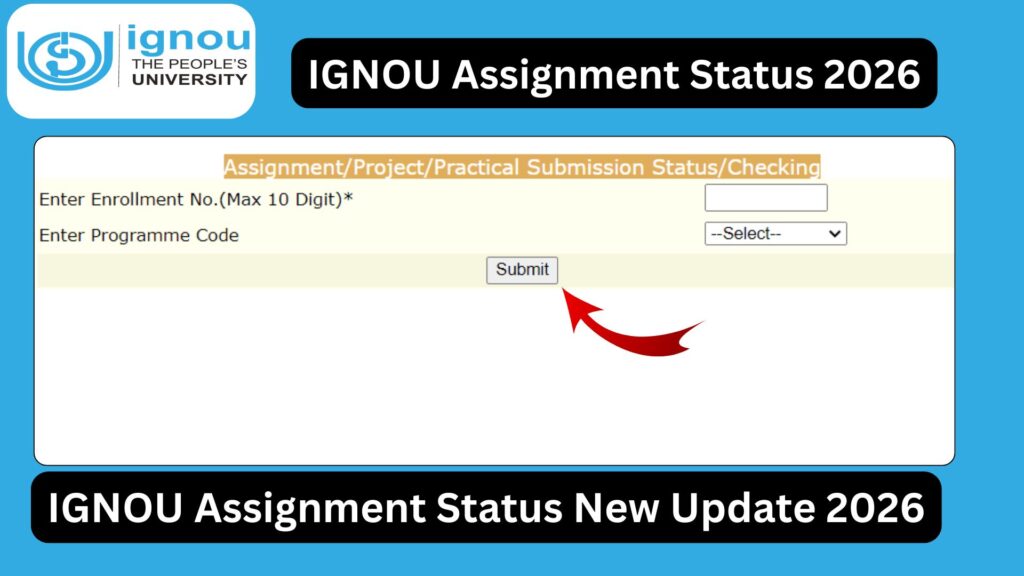
IGNOU Assignment Status 2026: IGNOU assignments are a critical part of every student’s academic journey. After submitting assignments, the next important step is to check whether they have been received, evaluated, and updated in the system. Many students often feel confused or anxious about their IGNOU Assignment Status 2026, especially when updates are delayed.

This comprehensive guide will help you understand everything about IGNOU assignment status, including how to check it, what different statuses mean, common issues, and solutions.
What is IGNOU Assignment Status?
IGNOU Assignment Status refers to the current progress of your submitted assignments in the university system. It shows whether your assignments have been:
- Received by the study center
- Under evaluation
- Marks updated in the system
This status helps students track their academic progress and ensure that their assignments are properly recorded.
Importance of Checking IGNOU Assignment Status
Checking your assignment status regularly is very important for several reasons:
1. Confirmation of Submission
It confirms that your assignment has been successfully received.
2. Marks Verification
You can check whether your marks have been uploaded.
3. Avoid Academic Issues
Helps identify missing assignments early.
4. Exam Eligibility
Ensures you meet requirements for appearing in exams.
IGNOU Assignment Status 2026 Check Link
Students can check their assignment status online using the official IGNOU portal:
https://isms.ignou.ac.in/changeadmdata/StatusAssignment.asp
How to Check IGNOU Assignment Status 2026
Follow these simple steps:
Step 1: Visit the Official Link
Open the link provided above.
Step 2: Enter Enrollment Number
Type your correct enrollment number.
Step 3: Select Program Code
Choose your course/program.
Step 4: Submit Details
Click on the submit button.
Step 5: View Status
Your assignment status will appear on the screen.
Details Displayed in Assignment Status
When you check your status, you will see:
- Course Code
- Assignment Submission Status
- Marks Obtained
- Date of Update
Important Links and Information
Below is a table containing essential links and details:
| Purpose | Link / Information |
|---|---|
| Check Assignment Status | https://isms.ignou.ac.in/changeadmdata/StatusAssignment.asp |
| IGNOU Official Website | https://www.ignou.ac.in |
| IGNOU Student Portal | https://ignou.samarth.edu.in |
| Assignment Download | https://www.ignou.ac.in/studentService/download/assignments |
| Mode | Online |
| Required Details | Enrollment Number, Program Code |
| Session | January/July 2026 |
Understanding IGNOU Assignment Status Messages
When checking your status, you may see different messages:
1. Not Updated
Your assignment has not been processed yet.
2. Received
Assignment has been received by the study center.
3. Under Evaluation
Assignment is being checked.
4. Marks Updated
Marks have been uploaded successfully.
How Long Does It Take to Update Assignment Status?
The update process may take time due to:
- Large number of students
- Manual evaluation process
- Data upload delays
Expected Timeline:
- 30 to 45 days after submission
- Sometimes longer during peak sessions
Reasons for Delay in Assignment Status Update
There are several reasons why your assignment status may not be updated:
1. Late Submission
Assignments submitted after deadline may be delayed.
2. Evaluation Delay
Study centers may take time to evaluate.
3. Data Upload Delay
Marks may not be updated immediately.
4. Technical Issues
Portal errors or server delays.
What to Do If Assignment Status is Not Updated?
If your status is not updated, follow these steps:
1. Wait for Some Time
Allow at least 30–45 days.
2. Contact Study Center
Check with your study center for confirmation.
3. Keep Proof of Submission
Always keep receipt or acknowledgment.
4. Check Regularly
Visit the portal frequently.
IGNOU Assignment Marks Not Showing
Sometimes students see status but not marks.
Possible Reasons:
- Marks not uploaded yet
- Evaluation pending
- Technical delay
Solution:
- Wait for updates
- Contact study center if delayed
Difference Between Assignment Status and Grade Card
Many students confuse assignment status with grade card.
Assignment Status:
- Shows submission and marks
Grade Card:
- Shows final marks including exams
Tips to Avoid Assignment Issues
- Submit assignments before deadline
- Use correct format
- Attach front page
- Keep submission proof
- Check status regularly
What If Assignment is Not Found in Status?
If your assignment is not showing:
- Check enrollment number
- Verify program code
- Wait for update
- Contact study center
IGNOU Assignment Re-Submission
If your assignment is not accepted:
- Rewrite assignment
- Submit again
- Follow updated guidelines
Benefits of Tracking Assignment Status
- Ensures academic progress
- Avoids missing marks
- Helps in planning exams
- Reduces stress
FAQ
How can I check IGNOU assignment status 2026?
You can check it online using:
https://isms.ignou.ac.in/changeadmdata/StatusAssignment.asp
How long does it take to update status?
Usually 30 to 45 days after submission.
What if my assignment status is not updated?
Wait for some time and contact your study center if needed.
Can I appear in exam without assignment submission?
No, assignment submission is mandatory.
Why are my marks not showing?
Marks may not be uploaded yet.
What details are required to check status?
Enrollment number and program code.
Can I check status multiple times?
Yes, you can check anytime.
What if assignment is rejected?
You need to resubmit it.
Is assignment status same as grade card?
No, both are different.
What should I do if marks are incorrect?
Contact your study center immediately.
Conclusion
IGNOU Assignment Status 2026 is an essential tool for students to track their assignment submission and evaluation progress. It provides transparency and helps students ensure that their academic work is properly recorded.
While delays in status updates are common due to the large number of students, it is important to stay patient and regularly check the portal. Keeping submission proof and staying in touch with your study center can help resolve most issues.
Students should always submit assignments on time, follow guidelines carefully, and monitor their status to avoid any academic complications. Proper tracking ensures that your hard work is reflected in your final results.
To check your IGNOU assignment status, visit the official link:
https://isms.ignou.ac.in/changeadmdata/StatusAssignment.asp
By following this complete guide, you can confidently track your assignment progress and stay on track in your IGNOU academic journey.