
IGNOU Project Status 2026: Complete Guide to Check, Process, Approval, and Updates

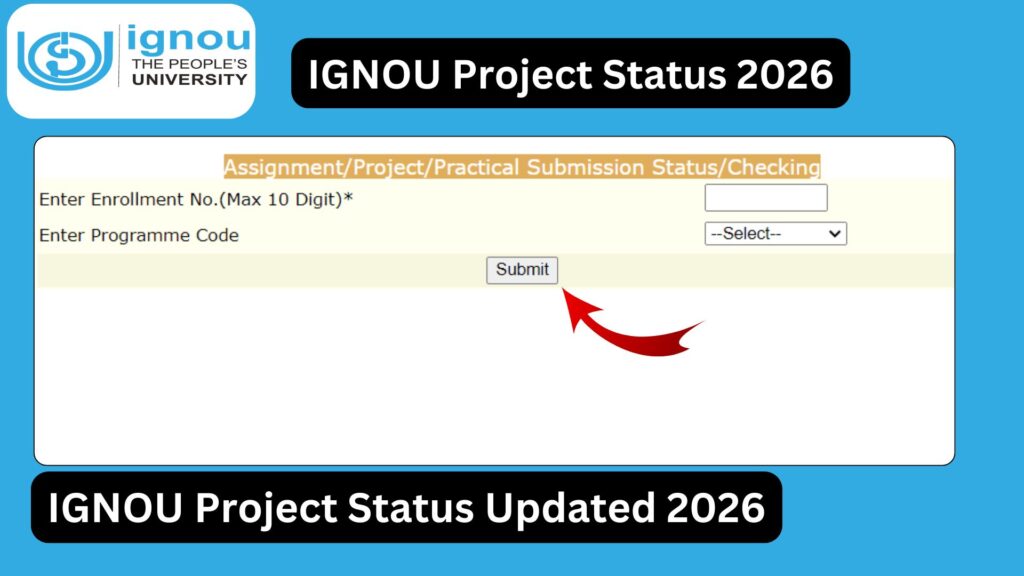
IGNOU Project Status 2026: Indira Gandhi National Open University (IGNOU) is known for its flexible and learner-centric approach to education. For many undergraduate, postgraduate, diploma, and professional courses, submitting a project or dissertation is a mandatory requirement. After submission, students often become anxious to know whether their project has been received, evaluated, and approved.

Tracking your IGNOU project status is essential to ensure that your academic progress is on the right path. In this detailed guide, you will learn everything about IGNOU project status, including how to check it, evaluation process, common issues, and tips to ensure approval.
What is an IGNOU Project?
An IGNOU project is a research-based or practical assignment that students must complete as part of their course curriculum. It is designed to assess:
- Practical knowledge
- Research ability
- Analytical skills
- Understanding of subject matter
Projects are usually required in programs such as:
- MBA
- MCA
- MA
- MCom
- BCA
- Various diploma and certificate courses
Importance of IGNOU Project Status
Checking your project status is crucial for several reasons:
- Confirms whether your project has been received
- Shows if the project is under evaluation
- Indicates approval or rejection
- Helps you plan your next academic steps
- Ensures timely completion of your program
If your project is not approved, your degree may be delayed.
Official Link to Check IGNOU Project Status
You can check your project or assignment status using the official IGNOU portal:
https://isms.ignou.ac.in/changeadmdata/StatusAssignment.asp
Important Links and Information
Below is a table with essential links and details related to IGNOU project status:
| Purpose | Details / Link |
|---|---|
| Check Project Status | https://isms.ignou.ac.in/changeadmdata/StatusAssignment.asp |
| IGNOU Official Website | https://www.ignou.ac.in |
| Student Zone | https://www.ignou.ac.in/ignou/studentzone |
| Grade Card Status | https://gradecard.ignou.ac.in |
| Admission Portal | https://ignouadmission.samarth.edu.in |
| Assignment Submission Status | https://isms.ignou.ac.in/changeadmdata/StatusAssignment.asp |
| Project Guidelines | https://www.ignou.ac.in |
| Regional Centres | https://www.ignou.ac.in/ignou/aboutignou/regional/website |
| Student Support Email | ssc@ignou.ac.in |
| Helpline Number | 011-29572513 |
To directly check your project status, visit:
https://isms.ignou.ac.in/changeadmdata/StatusAssignment.asp
Step-by-Step Process to Check IGNOU Project Status
Follow these steps to check your project status online:
Step 1: Visit the Official Portal
Go to the official project status page:
https://isms.ignou.ac.in/changeadmdata/StatusAssignment.asp
Step 2: Enter Enrollment Number
Enter your Enrollment Number carefully.
Step 3: Select Program Code
Choose your program from the dropdown list.
Step 4: Submit Details
Click on the “Submit” button.
Step 5: View Status
Your project status will appear on the screen, showing details such as:
- Submission status
- Evaluation status
- Marks obtained
- Approval or rejection
IGNOU Project Submission Process
Understanding the submission process helps in tracking the status effectively.
1. Topic Selection
Students must select a project topic as per IGNOU guidelines.
2. Synopsis Approval
A project proposal or synopsis must be submitted and approved.
3. Project Preparation
Students prepare the project under supervision.
4. Submission
The final project is submitted to the study centre or online portal.
5. Evaluation
IGNOU evaluates the project.
6. Result Update
Marks and status are updated online.
Types of Project Status Explained
When you check your status, you may encounter the following:
1. Not Received
Your project has not yet been recorded in the system.
2. Received
IGNOU has received your project.
3. Under Evaluation
Your project is being assessed by evaluators.
4. Approved
Your project has been accepted.
5. Rejected
Your project has been rejected and needs resubmission.
6. Marks Updated
Your marks have been uploaded to the system.
Time Required for Project Status Update
The project evaluation process may take:
- 30 to 60 days after submission
- Sometimes up to 90 days depending on workload
Students should check the portal regularly for updates.
Common Reasons for Delay in Project Status
Delays can occur due to:
- Late submission
- High volume of projects
- Incomplete documentation
- Errors in enrollment details
- Administrative processing delays
Common Issues and Solutions
1. Project Status Not Showing
- Wait for a few weeks after submission
- Verify your enrollment number
2. Incorrect Details
- Contact your regional centre
- Request correction
3. Project Rejected
- Review feedback
- Make corrections
- Resubmit the project
4. Marks Not Updated
- Check grade card
- Contact IGNOU support
Tips for Successful Project Approval
To ensure your project is approved:
- Follow IGNOU guidelines strictly
- Choose a relevant and approved topic
- Submit the project on time
- Avoid plagiarism
- Maintain proper formatting
- Include all required sections
Structure of an IGNOU Project
A standard IGNOU project includes:
- Title Page
- Declaration
- Acknowledgement
- Table of Contents
- Introduction
- Literature Review
- Research Methodology
- Data Analysis
- Findings
- Conclusion
- Bibliography
Role of Project Guide
A project guide or supervisor plays an important role in:
- Approving your topic
- Providing guidance
- Reviewing your work
- Ensuring quality
Students should stay in regular contact with their guide.
IGNOU Project Status vs Assignment Status
| Feature | Project Status | Assignment Status |
|---|---|---|
| Nature | Research work | Written assignments |
| Evaluation Time | Longer | Shorter |
| Importance | High | Mandatory |
| Submission | Once | Multiple times |
What to Do After Project Approval?
Once your project is approved:
- Check your marks
- Verify grade card update
- Prepare for final exams if pending
- Apply for convocation
What If Your Project is Rejected?
If your project is rejected:
- Identify the reasons
- Make necessary corrections
- Consult your guide
- Resubmit within the deadline
Rejection is not uncommon and can be corrected with proper effort.
IGNOU Project Status for Different Programs
Project requirements and evaluation may differ for:
- MBA projects (more detailed and professional)
- MCA/BCA projects (technical focus)
- MA/MCom projects (research-based)
However, the status checking process remains the same.
Benefits of Tracking Project Status
Regularly checking your project status helps you:
- Stay updated on evaluation progress
- Avoid delays in degree completion
- Take timely action if issues arise
- Plan future academic steps
FAQ about IGNOU Project Status 2026
How can I check my IGNOU project status?
You can check it online using your enrollment number on the official portal.
How long does project evaluation take?
It usually takes 30 to 90 days.
What if my project status is not showing?
Wait for some time or contact your regional centre.
Can I resubmit a rejected project?
Yes, you can correct and resubmit it.
Is the project compulsory for all courses?
No, only specific programs require projects.
Where are project marks updated?
Project marks are updated in the grade card.
What if marks are not updated after approval?
Contact IGNOU support or your regional centre.
Can I check project status multiple times?
Yes, you can check it anytime online.
Conclusion
The IGNOU project is a crucial component of many academic programs, and its successful completion is necessary for obtaining your degree. Keeping track of your IGNOU project status ensures that you stay informed about the progress of your submission and take timely action if needed.
By understanding the process, following guidelines, and regularly checking your status, you can avoid unnecessary delays and ensure smooth completion of your course. Always keep your documents organized, maintain communication with your project guide, and monitor updates on the official portal.
To check your IGNOU project status, use the official link below:
https://isms.ignou.ac.in/changeadmdata/StatusAssignment.asp
With proper planning and attention, you can successfully complete your project and move forward in your academic and professional journey.