
How to Submit IGNOU Assignment Online 2026? Complete Step-by-Step Guide

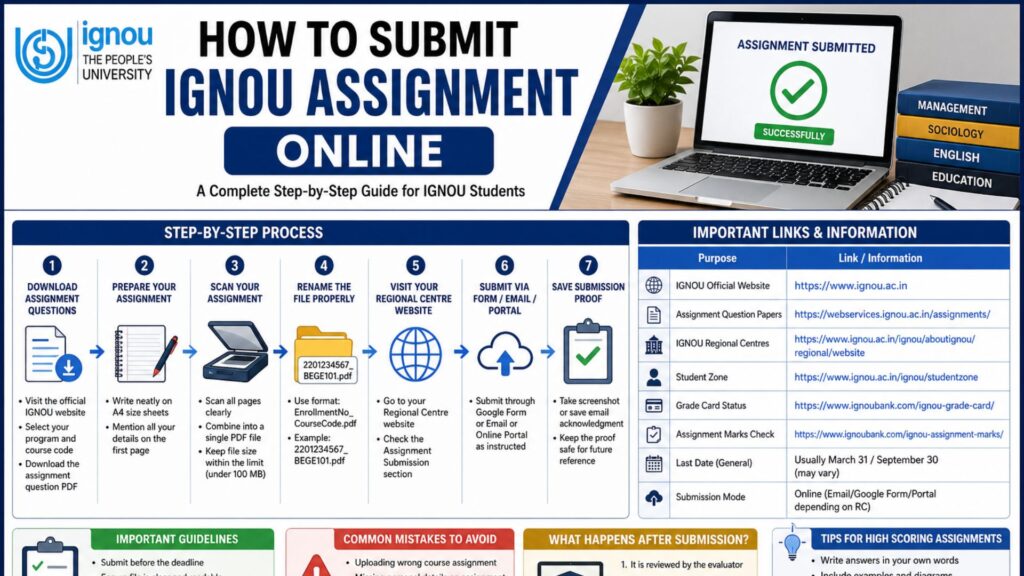
How to Submit IGNOU Assignment Online: Submitting assignments is a crucial part of the academic journey for students enrolled in Indira Gandhi National Open University (IGNOU). Assignments not only contribute significantly to your final grades but also help you understand the course material in a practical and structured way. With the advancement of digital systems, IGNOU has made it easier for students to submit assignments online, saving time and effort.

In this comprehensive guide, you will learn everything about how to submit IGNOU assignments online, including step-by-step instructions, important guidelines, common mistakes to avoid, and frequently asked questions.
Introduction to IGNOU Assignment Submission
IGNOU requires students to submit assignments for each course before appearing in the term-end examination (TEE). These assignments carry a certain percentage of marks (usually 30%) and are mandatory to pass the course.
Earlier, students had to physically submit assignments at their respective study centers. However, IGNOU has introduced an online submission system that allows students to upload their assignments digitally.
Why IGNOU Assignments Are Important?
Before understanding the submission process, it is important to know why assignments matter:
- They are compulsory for eligibility in term-end exams
- They contribute to your final grade
- They improve your understanding of the subject
- They help in continuous evaluation
Failing to submit assignments can result in not being allowed to sit for exams.
Important Links and Information
Below is a table containing important links and key details related to IGNOU assignment submission:
| Purpose | Link / Information |
|---|---|
| IGNOU Official Website | https://www.ignou.ac.in |
| Assignment Question Papers | https://webservices.ignou.ac.in/assignments/ |
| IGNOU Regional Centres | https://www.ignou.ac.in/ignou/aboutignou/regional/website |
| Student Zone | https://www.ignou.ac.in/ignou/studentzone |
| Grade Card Status | https://www.bookhouseadda.com/ignou-grade-card/ |
| Assignment Marks Check | https://www.bookhouseadda.com/ignou-assignment-marks/ |
| Last Date (General) | Usually March 31 / September 30 (may vary) |
| Submission Mode | Online (Email/Google Form/Portal depending on RC) |
Step-by-Step Guide to Submit IGNOU Assignment Online
Step 1: Download Assignment Questions
- Visit the official IGNOU assignment page
- Select your program and course code
- Download the assignment question PDF
- Ensure you download the correct session (e.g., January or July)
Step 2: Prepare Your Assignment
Follow these guidelines while writing your assignment:
- Use A4 size sheets
- Write in clear and readable handwriting
- Use blue or black pen
- Mention your details on the first page:
- Name
- Enrollment Number
- Course Code
- Study Centre Code
- Program Name
- Session
Step 3: Scan Your Assignment
After completing your assignment:
- Scan all pages using a scanner or mobile app
- Ensure clarity and readability
- Combine all pages into a single PDF file
- Keep file size within the prescribed limit (usually under 100 MB)
Recommended apps:
- Adobe Scan
- CamScanner
- Microsoft Lens
Step 4: Rename the File Properly
Use a proper naming format for your file:
Example:EnrollmentNumber_CourseCode.pdf2201234567_BEGE101.pdf
This helps evaluators easily identify your submission.
Step 5: Visit Your Regional Centre Website
IGNOU assignment submission is usually handled by regional centers. Therefore:
- Visit your respective regional centre website
- Look for “Assignment Submission” section
- Check instructions carefully
Each regional center may have a different submission method.
Step 6: Submit via Google Form / Email / Portal
There are three common methods used:
1. Google Form Submission
- Fill in required details
- Upload your assignment PDF
- Submit the form
2. Email Submission
- Compose an email
- Attach your assignment
- Mention details in the email body
- Send to the official email ID
3. Online Portal Upload
- Login to the portal
- Upload assignment file
- Confirm submission
Step 7: Save Submission Proof
After submission:
- Take a screenshot of confirmation
- Save email acknowledgment
- Download receipt (if available)
This is important in case of discrepancies.
Important Guidelines for Online Submission
- Submit before the deadline
- Ensure file is not corrupted
- Upload correct subject assignment
- Do not submit multiple times unless required
- Keep backup of your assignment
Common Mistakes to Avoid
Students often make errors during submission. Avoid these:
- Uploading wrong course assignment
- Missing personal details on assignment
- Submitting blurred or unreadable scans
- Ignoring file naming format
- Waiting until the last date
What Happens After Submission?
Once you submit your assignment:
- It is reviewed by the evaluator
- Marks are uploaded to IGNOU database
- Marks appear in your grade card
It may take 30–60 days for marks to reflect.
How to Check IGNOU Assignment Status?
You can track your assignment marks online:
- Visit the assignment marks link
- Enter enrollment number
- Check subject-wise marks
This helps you verify whether your assignment has been evaluated.
Tips for High Scoring Assignments
To get good marks:
- Write answers in your own words
- Include examples and diagrams
- Maintain neat presentation
- Follow word limits
- Answer all questions
Offline vs Online Submission
| Criteria | Offline | Online |
|---|---|---|
| Mode | Physical submission | Digital upload |
| Convenience | Low | High |
| Time | Time-consuming | Fast |
| Risk | Loss of documents | Technical errors |
| Proof | Receipt | Screenshot/Email |
Online submission is more efficient but requires careful attention to details.
FAQ about How to Submit IGNOU Assignment Online
Is IGNOU assignment submission compulsory?
Yes, assignment submission is mandatory. Without it, you cannot appear for term-end exams.
What is the last date for IGNOU assignment submission?
Generally, the last date is March 31 for June TEE and September 30 for December TEE. However, dates may be extended.
Can I submit IGNOU assignments after the deadline?
Late submission is usually not accepted unless IGNOU extends the deadline officially.
How do I know if my assignment is submitted successfully?
You will receive confirmation via email, form submission message, or portal acknowledgment.
Can I resubmit my assignment?
Resubmission is allowed only if:
You failed the assignment
You missed submission earlier
What if my assignment marks are not updated?
Wait for at least 30–60 days. If still not updated, contact your study center or regional center.
Can I type my assignment instead of handwriting?
IGNOU generally prefers handwritten assignments unless stated otherwise.
What file format should I use?
PDF format is recommended and widely accepted.
Can I submit assignments for multiple courses together?
Yes, but ensure each course assignment is clearly separated and properly named.
Is there any fee for assignment submission?
No, assignment submission is free of cost.
Conclusion
Submitting IGNOU assignments online is a straightforward process if you follow the correct steps and guidelines. From downloading the assignment questions to uploading the final PDF, each stage requires attention to detail. The key is to stay organized, adhere to deadlines, and ensure accuracy in your submission.
Assignments play a significant role in your academic performance, so take them seriously. With proper planning and execution, you can not only submit your assignments successfully but also score high marks.
By following this complete guide, you now have a clear understanding of how to submit IGNOU assignments online without confusion or errors.