
IGNOU Front Page Assignment 2026: Complete Guide to Download, Fill, and Submit Properly

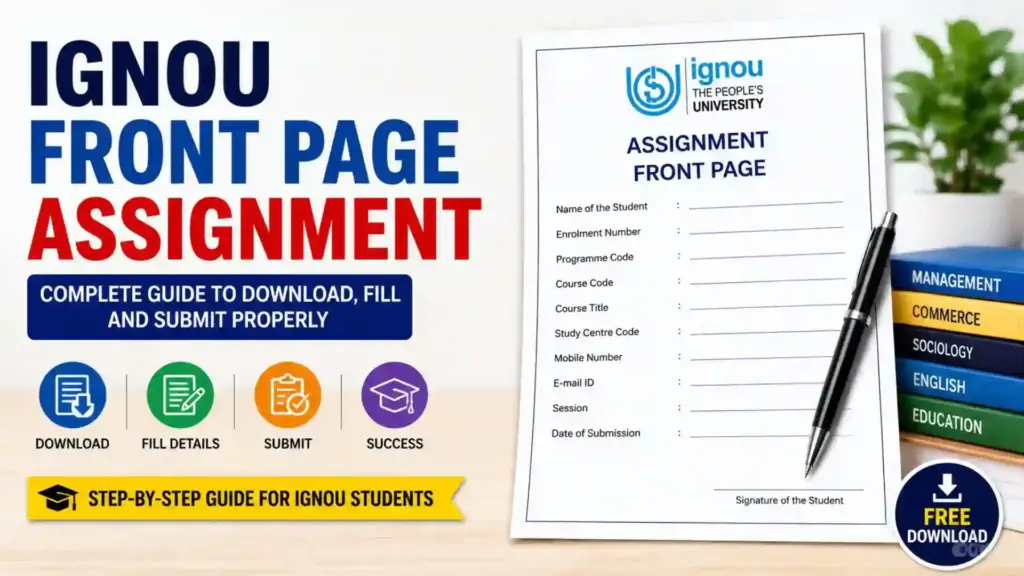
IGNOU Front Page Assignment 2026: Students of Indira Gandhi National Open University must submit assignments for almost every course before appearing in the term-end examination. One of the most important parts of assignment submission is the IGNOU assignment front page. Many students focus only on writing answers and ignore the front page details, but incorrect or incomplete front pages can create problems during evaluation and result updates.
The IGNOU assignment front page acts as the identification sheet for your assignment file. It contains important details such as your name, enrollment number, program code, course code, study center, mobile number, email ID, and session information. Without these details, your assignment may not be properly verified or uploaded by the university.

In this detailed guide, you will learn everything about the IGNOU assignment front page, including its importance, required details, downloading process, formatting rules, common mistakes, and submission tips. You will also get the direct download link for the IGNOU assignment front page format.
Important Links and Information
| Details | Information |
|---|---|
| University Name | Indira Gandhi National Open University (IGNOU) |
| Purpose | Assignment Submission Cover Page |
| Required For | All IGNOU Programs and Courses |
| Mode | Handwritten Assignment Submission |
| Front Page Format | PDF/Printable Format |
| Official Use | Identification and Verification of Assignment |
| Mandatory Details | Name, Enrollment Number, Course Code, Study Centre |
| Assignment Submission Mode | Online/Offline Depending on Study Centre |
| Session Mention | January or July Session |
| Download Link | Download IGNOU Assignment Front Page |
What is an IGNOU Assignment Front Page?
The IGNOU assignment front page is the first page attached to every assignment submitted by students. It works as a cover page containing personal and academic details that help the university identify the student and the course for which the assignment has been submitted.
Whenever you prepare an assignment for IGNOU, you must attach a properly filled front page before the handwritten answers. This page is checked by study centers and evaluators during assignment processing.
The front page generally includes:
- Student name
- Enrollment number
- Program code
- Course code
- Study center code
- Session
- Mobile number
- Email address
- Assignment submission date
This information ensures that the assignment reaches the correct evaluator and marks are updated properly in the student’s academic records.
Why is the IGNOU Assignment Front Page Important?
Many IGNOU students underestimate the importance of the assignment front page. However, it plays a major role in assignment verification and evaluation. An incomplete or incorrect front page can delay assignment status updates or even lead to rejection in some cases.
Here are the main reasons why the front page is important:
Student Identification
The front page clearly identifies the student submitting the assignment. Since thousands of assignments are received by study centers, the front page helps staff organize and verify submissions correctly.
Course Verification
Every IGNOU program contains multiple subjects. The course code mentioned on the front page helps evaluators identify the exact subject and assignment file.
Proper Assignment Tracking
Assignments move through different stages including submission, evaluation, marks entry, and record maintenance. The front page helps staff track assignments easily.
Avoids Confusion
Without a proper front page, assignments may get mixed with those of other students. Accurate details reduce the risk of confusion.
Required for Marks Update
Assignment marks are uploaded based on enrollment number and course code. If these details are incorrect, marks may not reflect in the grade card.
Details Mentioned on the IGNOU Assignment Front Page
Students should carefully fill every field on the assignment cover page. Even a small mistake can create issues later.
Name of the Student
Write your full name exactly as registered with IGNOU. Avoid using short forms or nicknames.
Enrollment Number
Your enrollment number is the most important identification detail. Double-check every digit before submission.
Program Code
Mention your program correctly. Examples include:
- BAG
- BCOMG
- MEG
- MHD
- MPS
- BTS
- BCA
- MCA
Course Code
Every subject has a separate course code such as:
- BEGC-101
- MPS-001
- BCOC-131
- MHD-02
Write the correct course code for the assignment file.
Study Centre Code
Mention the study center where you are enrolled. This helps in proper assignment routing.
Session
Mention whether you belong to the January session or July session.
Mobile Number
Provide an active mobile number for communication.
Email Address
Use a valid email address for future correspondence.
Date of Submission
Write the date on which you are submitting the assignment.
How to Download IGNOU Assignment Front Page?
Students can download the assignment front page in PDF format and print it before attaching it to assignments.
You can download the front page directly from the following link:
IGNOU Assignment Front Page PDF Download
After downloading:
- Print the front page
- Fill all details carefully
- Attach it to the beginning of your assignment
- Arrange assignments subject-wise
- Submit according to study center instructions
How to Fill IGNOU Assignment Front Page Properly?
Filling the front page correctly is very important. Follow these steps carefully:
Use Clear Handwriting
Write all details in clean and readable handwriting. Avoid overwriting.
Use Black or Blue Pen
Most study centers prefer black or blue ink only.
Match Details with IGNOU Records
Ensure your name, enrollment number, and program code match official IGNOU records.
Write Correct Course Codes
Many students mistakenly write wrong subject codes. Verify from your assignment question paper.
Separate Front Pages for Each Subject
Every course assignment should have its own front page.
Keep Information Accurate
Incorrect information can create delays in marks updates.
Format of IGNOU Assignment Front Page
A standard IGNOU assignment front page generally contains:
- IGNOU logo or heading
- Assignment title
- Session
- Program details
- Student information
- Course information
- Study center information
- Signature section
Students may either use handwritten details or typed information, depending on preference and study center guidelines.
Assignment Submission Rules in IGNOU
Assignment submission rules may vary slightly among study centers, but some common rules remain the same.
Handwritten Assignments are Mandatory
IGNOU usually requires assignments to be handwritten unless specifically stated otherwise.
Use A4 Size Paper
Assignments should generally be written on A4 sheets.
Attach Front Page
Every assignment file must include the front page.
Arrange Pages Properly
Keep pages in order and staple them securely.
Submit Before Deadline
Late submissions may not be accepted for the current term-end examination cycle.
Online and Offline Assignment Submission
IGNOU study centers may allow online or offline assignment submission.
Offline Submission
In offline mode, students physically submit assignments at the study center.
Requirements usually include:
- Printed front page
- Handwritten assignment
- Stapled pages
- Student signature
Online Submission
Some study centers accept scanned PDF assignments through email or Google Forms.
In online mode:
- Scan the assignment clearly
- Include front page in PDF
- Name files properly
- Upload before deadline
Common Mistakes Students Make
Students often make avoidable mistakes while preparing assignment front pages.
Wrong Enrollment Number
Incorrect enrollment numbers can result in marks not being updated.
Missing Course Code
Without a course code, evaluators may not identify the subject correctly.
Incomplete Details
Leaving fields blank creates verification issues.
One Front Page for Multiple Subjects
Every assignment requires a separate front page.
Unclear Handwriting
Poor handwriting may create confusion during evaluation.
Incorrect Session Details
Mentioning the wrong session can create record mismatches.
Tips to Prepare IGNOU Assignments Effectively
Start Early
Do not wait until the last date to write assignments.
Read Questions Carefully
Understand each question before writing answers.
Write in Your Own Words
Avoid copying directly from books or online sources.
Maintain Proper Presentation
Use headings and neat handwriting.
Number Pages Properly
Page numbering improves organization.
Keep Copies
Always keep scanned or photocopied copies before submission.
Importance of Assignments in IGNOU
Assignments are an essential part of IGNOU’s evaluation system. They carry significant weightage in final results.
Benefits of submitting assignments properly include:
- Eligibility for term-end exams
- Internal assessment marks
- Better overall grades
- Improved understanding of subjects
- Academic progress tracking
Without assignment submission, students cannot complete their courses successfully.
How IGNOU Evaluates Assignments?
After submission, assignments go through different stages.
Verification
Study center staff verify student details and course codes.
Evaluation
Assignments are sent to evaluators for marking.
Marks Upload
Marks are uploaded to the IGNOU portal.
Grade Card Update
Assignment marks appear in the student’s grade card.
This entire process depends heavily on accurate information mentioned on the assignment front page.
Best Practices for IGNOU Students
To avoid problems during assignment submission, students should follow these best practices:
- Verify course codes from official assignment PDFs
- Write clean and organized answers
- Attach proper front pages
- Submit assignments before deadlines
- Keep proof of submission
- Check assignment status regularly
- Maintain scanned copies of all assignments
Can Students Create Their Own Front Page?
Yes, students can create their own assignment front page if all required details are included properly. However, most students prefer downloading ready-made formats because they are easier and more organized.
Using a standard format also reduces the chances of missing important details.
Difference Between Assignment Front Page and Assignment Question Paper
Many students confuse the assignment front page with the assignment question paper.
| Assignment Front Page | Assignment Question Paper |
|---|---|
| Contains student details | Contains assignment questions |
| Attached at beginning | Used as reference |
| Mandatory for submission | Not always attached |
| Helps in identification | Helps in answering questions |
FAQ about IGNOU Front Page Assignment 2026
Is the IGNOU assignment front page compulsory?
Yes, the assignment front page is compulsory for every assignment submission.
Can I use the same front page for all subjects?
No, every subject assignment requires a separate front page.
Can I type details on the front page?
Yes, typed details are generally accepted, but handwritten details are also common.
What happens if I write the wrong enrollment number?
Incorrect enrollment numbers may create issues in assignment marks updates.
Is the front page required for online submission?
Yes, even online assignment PDFs must include the front page.
Where can I download the IGNOU assignment front page?
You can download it here: Download Assignment Front Page PDF
Can assignments be rejected without a front page?
Yes, incomplete assignments without proper identification details may face rejection or delays.
Should I staple or bind assignments?
Most study centers accept stapled assignments, but students should follow local study center instructions.
Can I submit assignments after the deadline?
Late submission policies vary. However, late assignments may not be accepted for the current exam cycle.
Is handwritten assignment mandatory in IGNOU?
In most cases, yes. IGNOU generally requires handwritten assignments.
Conclusion
The IGNOU assignment front page is a small but extremely important part of assignment submission. It helps the university identify students, verify course details, process assignments correctly, and upload marks accurately. Students should never ignore the importance of filling the front page carefully and accurately.
Before submitting assignments, always verify your enrollment number, course code, study center code, and session details. Attach separate front pages for each subject and keep copies of all submitted assignments for future reference.
Using the correct front page format can save students from unnecessary delays and confusion during evaluation. To make the process easier, students can directly download the assignment front page from the link below: Download IGNOU Assignment Front Page Here