
IGNOU Admission Status 2026: How to Check Admission Confirmation Online

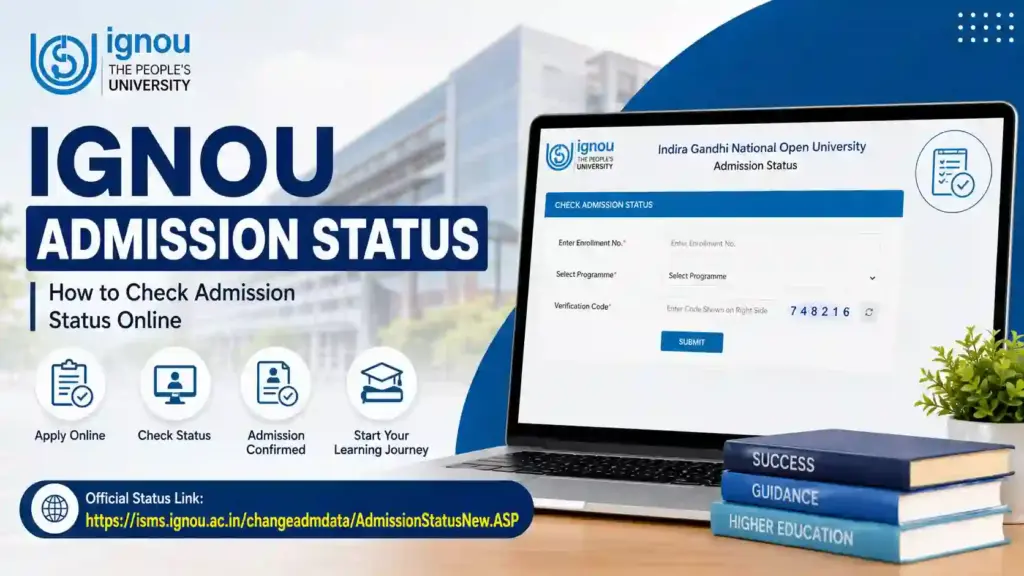
IGNOU Admission Status 2026: Indira Gandhi National Open University (IGNOU) is one of the largest distance-learning universities in the world. Every year, lakhs of students apply for undergraduate, postgraduate, diploma, certificate, and professional programs offered by the university. After submitting the admission form and paying the required fees, students eagerly wait for confirmation of their admission.
This is where the IGNOU Admission Status facility becomes important. Through the admission status portal, students can verify whether their application has been accepted, whether their documents have been approved, and whether their enrollment details have been generated.
Many students become anxious when they do not receive immediate confirmation after applying. However, IGNOU follows a verification process before approving admissions. Therefore, checking the admission status regularly helps students stay updated about their application progress.

In this guide, you will learn everything about IGNOU Admission Status, including how to check it, what the different status messages mean, common issues faced by students, and the steps to take if your admission remains pending.
Important IGNOU Admission Status Information
| Particulars | Details |
|---|---|
| University Name | Indira Gandhi National Open University (IGNOU) |
| Service Name | Admission Status Check |
| Mode | Online |
| Official Admission Status Link | https://isms.ignou.ac.in/changeadmdata/AdmissionStatusNew.ASP |
| Required Details | Enrollment Number and Programme Code |
| Purpose | Check admission confirmation and registration details |
| Applicable For | UG, PG, Diploma, Certificate, and Other IGNOU Programmes |
| Official Website | https://www.ignou.ac.in |
| Status Availability | After admission processing and verification |
What is IGNOU Admission Status?
IGNOU Admission Status is an online facility that allows students to verify whether their admission application has been processed and approved by the university.
Once a student submits the admission form and pays the required fee, IGNOU verifies:
- Educational documents
- Identity proof
- Photograph and signature
- Eligibility criteria
- Fee payment status
- Programme selection
After successful verification, the admission is confirmed and reflected in the admission status portal.
The portal provides information such as:
- Student name
- Enrollment number
- Programme code
- Admission validity
- Regional centre details
- Study centre information
- Registration status
This information helps students ensure that their admission has been successfully recorded in the IGNOU database.
Why Checking IGNOU Admission Status is Important?
Many students assume that fee payment automatically confirms admission. However, admission confirmation occurs only after document verification and approval by IGNOU.
Checking admission status helps students:
Verify Admission Confirmation
Students can confirm whether their application has been approved by the university.
Check Enrollment Number
Once admission is approved, students receive an enrollment number that is required for future academic activities.
Identify Issues Early
If any document is missing or rejected, students can take corrective action before deadlines expire.
Access Student Services
After admission confirmation, students can access:
- IGNOU ID Card
- Student Portal
- Assignment Submission
- Exam Form Submission
- Grade Card
- Re-registration Services
Track Registration Details
The portal provides complete registration information, helping students verify that all details are accurate.
How to Check IGNOU Admission Status Online?
Students can check their admission status through the official IGNOU portal by following these steps.
Step 1: Open the Admission Status Portal
Visit the official admission status page:
https://isms.ignou.ac.in/changeadmdata/AdmissionStatusNew.ASP
Step 2: Enter Enrollment Number
Enter your enrollment number in the required field.
Step 3: Select Programme Code
Choose your programme from the available list.
Examples include:
- BAG
- BCOMG
- BCA
- MCA
- MCOM
- MAH
- MEG
- MBA
Step 4: Complete Verification
Enter the captcha code displayed on the screen.
Step 5: Click Submit
Click the submit button.
Step 6: View Status
Your admission details will appear on the screen if your admission has been processed.
Information Displayed in IGNOU Admission Status
When the status page opens successfully, students can view several important details.
Student Name
The name entered during admission registration.
Enrollment Number
A unique number assigned to every IGNOU student.
Programme Name
The course in which the student is enrolled.
Admission Session
January Session or July Session.
Regional Centre
The regional centre responsible for managing student services.
Study Centre
The study centre assigned to the learner.
Registration Validity
The duration for which admission remains valid.
Admission Confirmation
The current status of the admission process.
Understanding Different IGNOU Admission Status Messages
Students may encounter different messages while checking admission status.
Admission Confirmed
This indicates that:
- Documents have been verified.
- Admission has been approved.
- Enrollment number has been generated.
- Student can access academic services.
Under Process
This means:
- Application is being reviewed.
- Documents are under verification.
- Final approval is pending.
Students should wait for further updates.
Pending Verification
This status appears when:
- Documents require manual verification.
- Educational qualifications need confirmation.
- Additional scrutiny is being conducted.
Incomplete Documents
This indicates:
- Required documents are missing.
- Uploaded documents are unclear.
- Corrections may be needed.
Students should contact IGNOU support if this status continues for a long period.
Rejected
Admission may be rejected because of:
- Eligibility issues
- Incorrect information
- Invalid documents
- Payment problems
Students should contact their regional centre for clarification.
How Long Does IGNOU Take to Confirm Admission?
Admission confirmation timelines may vary depending on application volume and document verification requirements.
Generally:
- Initial processing may begin within a few days.
- Document verification can take several days or weeks.
- Enrollment number generation occurs after successful verification.
Students should remain patient and continue monitoring their admission status regularly.
What to Do If Admission Status Is Not Updated?
Many students notice that their status does not appear immediately after submitting the application.
In such situations, follow these steps.
Wait for Processing
Admission data is uploaded in phases. Status updates may not appear instantly.
Verify Payment
Ensure that the payment transaction was successful.
Keep:
- Payment receipt
- Transaction ID
- Application confirmation
Check Documents
Verify that:
- Photograph is clear
- Signature is visible
- Certificates are uploaded correctly
Monitor Email and SMS
IGNOU often sends admission-related updates through registered email and mobile number.
Contact Regional Centre
If the status remains unavailable for an extended period, contact your assigned regional centre.
Common Reasons for Delay in Admission Confirmation
Several factors may delay admission approval.
Heavy Application Volume
During admission sessions, IGNOU receives a large number of applications.
Document Verification Delays
Verification of educational qualifications can take additional time.
Technical Issues
Occasional portal maintenance and technical problems may slow updates.
Incorrect Information
Errors in application details may require manual review.
Payment Reconciliation
Online payment confirmation sometimes takes extra time to reflect.
What Happens After Admission Confirmation?
Once admission is confirmed, students should complete several important tasks.
Download IGNOU ID Card
The ID card is required for:
- Study centre visits
- Assignment submission
- Examination participation
Access Student Portal
Students can log in to the student portal using their credentials.
Download Study Material
Study materials may be available in:
- Printed format
- Digital format
Submit Assignments
Assignment submission is mandatory for appearing in examinations.
Fill Examination Forms
Students must submit exam forms before the term-end examination.
Check Grade Card
After examinations, grades can be monitored through the grade card portal.
IGNOU Enrollment Number and Its Importance
The enrollment number is one of the most important identifiers for IGNOU students.
It is required for:
- Student login
- Assignment status
- Grade card checking
- Hall ticket download
- Examination form submission
- Re-registration
- Degree completion services
Therefore, students should keep their enrollment number secure.
Tips for Faster Admission Processing
To reduce delays, students should follow certain best practices.
Upload Clear Documents
Ensure that all uploaded documents are readable.
Use Correct Information
Match application details exactly with educational records.
Complete Payment Properly
Do not close the browser during payment processing.
Save Application Records
Keep copies of:
- Application form
- Payment receipt
- Confirmation email
Check Status Regularly
Monitor the admission portal periodically for updates.
Benefits of Online Admission Status Tracking
The online admission status system provides several advantages.
Convenience
Students can check status anytime from anywhere.
Transparency
The system provides real-time visibility into admission progress.
Faster Communication
Students can quickly identify problems and resolve them.
Reduced Dependency on Offices
Most information is available online without visiting regional centres.
Better Planning
Students can plan assignments and examinations after receiving confirmation.
FAQ about IGNOU Admission Status 2026
What is the official link to check IGNOU admission status?
Students can check admission status through:
https://isms.ignou.ac.in/changeadmdata/AdmissionStatusNew.ASP
What details are required to check admission status?
Generally, students need:
Enrollment Number
Programme Code
Verification Code
How long does IGNOU take to confirm admission?
The timeline varies depending on document verification and admission volume. Students should regularly monitor the status portal.
What should I do if my admission status is not available?
Wait for processing, verify documents and payment details, and contact the regional centre if delays continue.
Can I appear in examinations before admission confirmation?
No. Admission confirmation is necessary before participating in official academic activities.
What does “Under Process” mean?
It means your application is currently being reviewed and verified by IGNOU.
When will I receive my enrollment number?
The enrollment number is generated after successful admission approval.
What should I do if my admission is rejected?
Contact the concerned regional centre and identify the reason for rejection. You may be required to submit corrected documents.
Is admission status available for all programmes?
Yes. Most IGNOU programmes provide admission status tracking through the official portal.
Can I check admission status using my mobile phone?
Yes. The admission status portal is accessible through mobile devices and computers.
Conclusion
IGNOU Admission Status is an essential online facility that helps students verify whether their admission has been successfully processed and approved. By regularly checking the admission status portal, students can stay informed about document verification, enrollment generation, and registration confirmation.
After submitting an application, it is important to remain patient because admission approval may take some time depending on verification requirements and application volume. Students should keep their payment receipts, application records, and enrollment details safe for future reference.
Once admission is confirmed, learners can proceed with downloading their ID card, accessing study materials, submitting assignments, filling examination forms, and participating in their academic journey at IGNOU. Regular monitoring of the admission status portal ensures that students remain updated and can quickly resolve any issues that arise during the admission process.