
IGNOU Admission Status 2025: A Complete Step-by-Step Guide

IGNOU Admission Status 2025: Indira Gandhi National Open University (IGNOU), India’s largest and most popular distance education university, attracts lakhs of students every year. From working professionals and homemakers to regular students and career seekers, people from various walks of life choose IGNOU for its flexibility, affordability, and academic recognition.
If you have applied for admission in the January 2025 or July 2025 session, it is essential to keep track of your IGNOU Admission Status 2025. This step ensures your registration is confirmed, documents are verified, and you are officially enrolled in the course.

In this article, we will provide a comprehensive guide on how to check your IGNOU admission status, what different admission statuses mean, common issues students face, how to resolve them, FAQs, and much more. This detailed guide will help you stay updated and confident throughout your admission journey.
 Check IGNOU Admission Status 2025 Here:
https://isms.ignou.ac.in/changeadmdata/AdmissionStatusNew.ASP
Overview of IGNOU Admission 2025
IGNOU offers admissions in two cycles every year:
- January Session
- July Session
Admission is available in:
- Bachelor’s Degree Programs (BAG, BCOMG, BSCG, etc.)
- Master’s Degree Programs (MA, MCOM, MSC, etc.)
- Diploma & PG Diploma Courses
- Certificate Courses
- Professional & Skill-based Programs
All admissions are processed online through the Samarth Portal, and the final status can be checked from the admission status portal mentioned above.
Why Checking Admission Status is Important?
Many students believe that once they submit the application and pay the fee, their admission is confirmed. However, that’s not always the case. Admission confirmation depends on several factors, such as:
- Correct document uploads
- Eligibility verification
- Fee confirmation
- Subject selection accuracy
- Course availability
Hence, checking your admission status confirms that you are successfully enrolled in the course and can start accessing study material and submitting assignments.
How to Check IGNOU Admission Status 2025 Online?
Follow these simple steps to check your admission status for the year 2025.
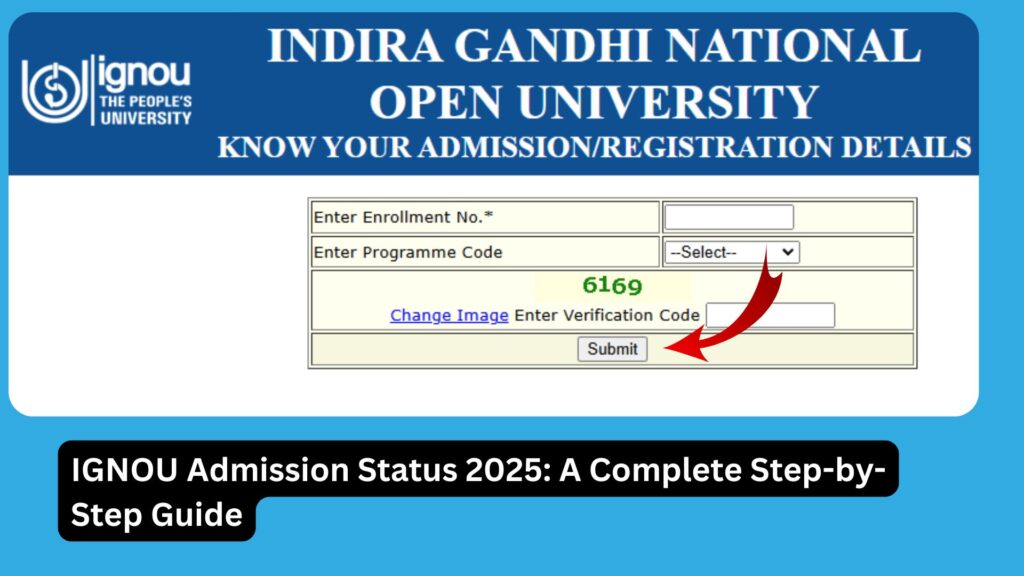
Step-by-Step Process
- Visit the official admission status portal: https://isms.ignou.ac.in/changeadmdata/AdmissionStatusNew.ASP
- Enter your Enrollment Number or Control Number
- Choose your Program Code (example: BAG, MPS, MEG, BCOMG, etc.)
- Click on the Submit button
- Your current admission status will be displayed on the screen
What Does Your Admission Status Indicate?
Once you check your status, it may show different types of messages. Here’s what they mean:
| Status Message | Meaning |
|---|---|
| Admission Confirmed | Your admission is successful and confirmed |
| Provisional Admission | Documents are accepted but subject to final verification |
| Pending Document Verification | Your uploaded documents are under review |
| Admission Cancelled | Admission is cancelled due to document rejection or incorrect info |
| Payment Not Received | Fee payment has not been confirmed by the system |
| Invalid Control Number | The control number entered is incorrect or not yet processed |
What is the Control Number in IGNOU?
When you submit the application, you receive a control number. This number is a unique identifier of your application and is used to track admission and registration status until an official enrollment number is allotted.
Make sure to note and save this number safely during application submission.
Common Issues Students Face in Admission Status
Despite completing the application process, many students face problems. Some of the common issues include:
| Issue | Possible Reason |
|---|---|
| No status update | Delay in document verification |
| Admission cancelled | Incomplete or incorrect documents |
| Payment not updated | Payment gateway delays or transaction failure |
| Enrollment number not allotted | Admission not yet confirmed |
| Invalid control number | Typing error or data not uploaded yet |
What to Do If Admission Status Shows Error?
If your admission status shows any issue, here are the recommended actions:
- Wait for 7–10 working days after application submission
- Contact your Regional Centre via email or phone
- Send a detailed email with:
- Full Name
- Control Number
- Date of Birth
- Program Code
- Issue Screenshot
- Attach proof of payment, document submission, or error message
- Track the response and follow up regularly
What After Admission is Confirmed?
Once your admission is confirmed, here’s what to do next:
1. Get Enrollment Number
You will receive a 9-digit Enrollment Number which will be used throughout your program.
2. Download ID Card
Visit the Samarth Portal and download your IGNOU Student Identity Card.
3. Check Study Material Status
Use the eGyanKosh portal or IGNOU Bank’s tracker to monitor the dispatch or download status of your study materials.
4. Submit Assignments
Start preparing and submitting assignments well before deadlines.
5. Join Telegram/WhatsApp groups
Join official or peer groups for guidance and updates related to your course.
How to Download IGNOU ID Card?
After your admission is confirmed, download your ID Card by logging in to the admission portal:
- Go to https://ignouadmission.samarth.edu.in
- Login using your registered email/mobile and password
- Click on Services > ID Card
- Download and print the ID card
This ID card is mandatory for exams, practicals, and counseling sessions.
Important Links
| Purpose | Link |
|---|---|
| IGNOU Admission Status 2025 | https://isms.ignou.ac.in/changeadmdata/AdmissionStatusNew.ASP |
| IGNOU Admission Portal | https://ignouadmission.samarth.edu.in |
| IGNOU Fee Payment Portal | https://onlineservices.ignou.ac.in/fees |
| IGNOU Student Login | https://ignou.samarth.edu.in |
| Download IGNOU ID Card | Available in student login dashboard |
| IGNOU Study Material Tracker | https://www.bookhouseadda.com/ignou-book-status/ |
| IGNOU Assignment Submission Status | https://admission.ignou.ac.in/changeadmdata/StatusAssignment.ASP |
FAQ about IGNOU Admission Status 2025
How do I know my IGNOU admission is confirmed?
You can check it by visiting:
https://isms.ignou.ac.in/changeadmdata/AdmissionStatusNew.ASP
If your admission status says “Admission Confirmed,” your admission is successful.
What is the Control Number in IGNOU?
It is a 11-digit number generated at the time of application submission. It helps track your admission before the enrollment number is allotted.
How long does IGNOU take to confirm admission?
It typically takes 7–15 days, depending on the volume of applications and speed of document verification.
My admission status is showing “Payment Not Received.” What should I do?
Check your bank transaction status. If payment was deducted, contact IGNOU’s payment helpdesk or Regional Centre with proof.
What to do if my admission is cancelled?
You can reapply in the next cycle or contact your Regional Centre to rectify the issue if there was a mistake in the submitted documents.
When will I receive my Enrollment Number?
Once your admission is confirmed, the Enrollment Number is generated. It is visible in your admission portal dashboard or in the confirmation email.
Can I download the ID card without an enrollment number?
No, the ID card becomes available only after the enrollment number is issued.
Is physical document verification needed?
Usually, IGNOU accepts online scanned document uploads. However, some Regional Centres may ask for physical verification later during exam registration or practical sessions.
Conclusion
Tracking your IGNOU Admission Status 2025 is a critical step after submitting your application. It ensures that your application, documents, and payment are processed successfully, and you are formally enrolled in your desired program.
Whether you are applying in the January or July 2025 session, make sure to regularly check your admission status through the official portal: https://isms.ignou.ac.in/changeadmdata/AdmissionStatusNew.ASP
If there are any issues, do not panic. IGNOU provides support through its Regional Centres and online helpdesks. Maintain all communication records, proofs of payment, and document submissions.
Once your admission is confirmed, proceed to download your ID card, start collecting study materials, and prepare your assignments well in time. With consistent effort and timely follow-ups, your IGNOU journey will be smooth and successful.