
IGNOU Assignment Front Page 2026: Complete Guide, Format, Sample & Download PDF

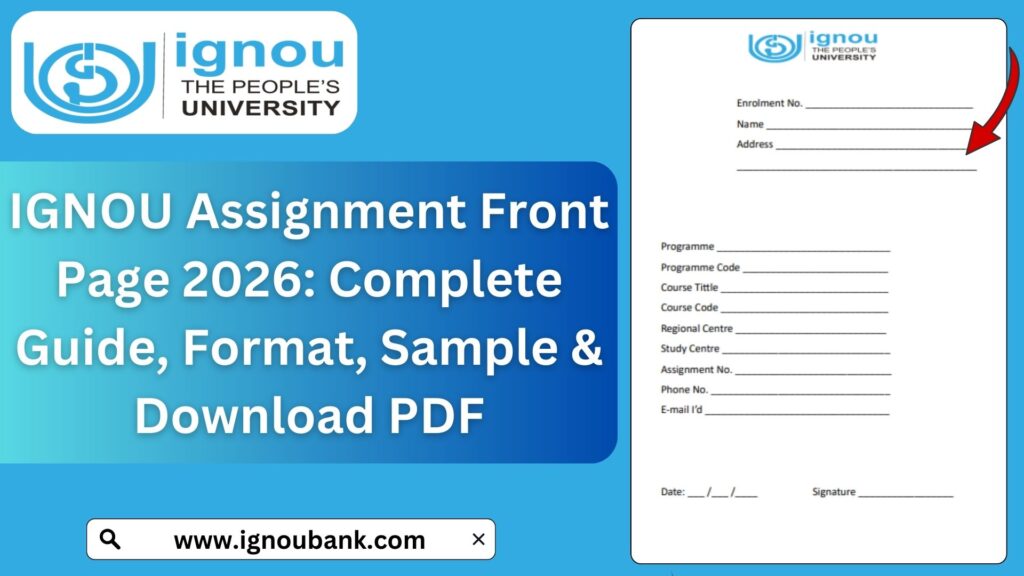
IGNOU Assignment Front Page: Indira Gandhi National Open University (IGNOU) follows a structured and standardized system for assignments. While most students focus primarily on writing answers, many overlook one of the most crucial components of assignment submission — the IGNOU assignment front page. A properly designed and correctly filled front page is not just a formality; it plays a vital role in identification, evaluation, and record maintenance.

Submitting an assignment without a correct front page or with incorrect details can lead to rejection, delay in evaluation, or even loss of marks. This article provides a complete and detailed guide on the IGNOU assignment front page, including its importance, format, mandatory details, common mistakes, and how to download the official front page PDF.
What Is the IGNOU Assignment Front Page?
The IGNOU assignment front page is the cover sheet attached at the beginning of every assignment. It contains essential student and course-related information that helps IGNOU identify:
- The student submitting the assignment
- The program and course for which the assignment is submitted
- The study centre and regional centre
- The academic session
This front page acts as an official record and ensures that your assignment is evaluated correctly and marks are uploaded to the correct student account.
Why the IGNOU Assignment Front Page Is Important?
Many students underestimate the importance of the assignment front page, but it serves multiple critical purposes:
- Student Identification
It links the assignment to the correct enrollment number and student name. - Course Verification
Helps evaluators identify the exact course and subject. - Study Centre Allocation
Ensures that the assignment reaches the correct study centre for evaluation. - Marks Upload Accuracy
Prevents errors while uploading marks to the grade card. - Official Compliance
IGNOU mandates the use of a proper front page for every assignment.
Assignments submitted without a valid front page may be rejected outright or returned unassessed.
Mandatory Details on IGNOU Assignment Front Page
Every IGNOU assignment front page must include specific information. Missing or incorrect details can cause serious issues.
Essential Information Required
- Name of the Student
- Enrollment Number
- Programme Code (e.g., BA, MA, BCOM, MPA)
- Course Code (e.g., BEGC-101, MPA-011)
- Assignment Number
- Study Centre Code
- Regional Centre Name
- Session (January or July)
- Contact Details (optional but recommended)
Standard Format of IGNOU Assignment Front Page
IGNOU does not insist on a decorative design. The front page should be simple, clean, and readable.
General Formatting Guidelines
- Use A4 size paper
- Black or blue pen for handwritten details
- Clear handwriting or printed text
- No unnecessary images or designs
- One front page per assignment
Each course assignment must have a separate front page.
IGNOU Assignment Front Page Sample Structure
A standard IGNOU assignment front page generally follows this layout:
- University Name at the top
- Title: “Assignment”
- Academic Session
- Student Details Section
- Course Details Section
- Study Centre Information
Using the official front page format is always recommended to avoid mistakes.
Download IGNOU Assignment Front Page PDF
To make things easier for students, a ready-to-use and printable IGNOU assignment front page PDF is available.
You can download the official IGNOU assignment front page PDF from the link below:
Download IGNOU Assignment Front Page PDF:
https://www.bookhouseadda.com/ignou-assignment-front-page/
This PDF is:
- Printable
- Editable after printing
- Accepted at all study centres
- Suitable for all IGNOU programs
Important Links and Information
| Description | Link |
|---|---|
| IGNOU Assignment Front Page PDF | https://www.bookhouseadda.com/ignou-assignment-front-page/ |
| Solved IGNOU Assignments | Available program-wise |
| Assignment Submission Mode | Online / Offline |
| Assignment Paper Size | A4 |
| Writing Medium | Blue or Black Pen |
| One Front Page Per Course | Mandatory |
How to Fill IGNOU Assignment Front Page Correctly?
Filling the front page correctly is just as important as writing good answers.
Step-by-Step Instructions
- Write Your Full Name
Use the same name as mentioned in IGNOU records. - Enter Enrollment Number Carefully
Double-check the digits to avoid mismatches. - Mention Correct Programme Code
Example: BA, MAH, MPA, BCOMG. - Fill Course Code Accurately
Each course has a unique code. - Add Study Centre Code
This determines where your assignment will be evaluated. - Mention Session Clearly
Example: January 2026 or July 2025. - Avoid Overwriting
Overwritten details can cause confusion during evaluation.
Online vs Offline Assignment Front Page Usage
Offline Submission
- Print the front page
- Fill details manually
- Attach it to the handwritten assignment
- Staple properly
Online Submission
- Fill details digitally (if allowed)
- Scan the front page along with assignment
- Upload as a single PDF file
Always follow your regional centre instructions for online submissions.
Common Mistakes to Avoid on IGNOU Assignment Front Page
Many students lose marks or face rejection due to avoidable errors.
Most Common Errors
- Writing incorrect enrollment number
- Missing study centre code
- Using the same front page for multiple courses
- Submitting assignments without front page
- Writing incomplete course details
- Using decorative or unofficial formats
Avoid these mistakes to ensure smooth evaluation.
Is Handwritten Front Page Allowed?
Yes, handwritten front pages are allowed and commonly accepted, provided:
- The format is correct
- All details are clearly written
- No information is missing
However, using a printed front page PDF looks more professional and reduces chances of error.
Do Different Programs Have Different Front Pages?
No. The same IGNOU assignment front page format is used for:
- Undergraduate programs
- Postgraduate programs
- Diploma courses
- Certificate programs
Only the program code and course code change.
Importance of Separate Front Page for Each Course
IGNOU requires a separate assignment front page for each subject. Combining multiple course assignments under one front page can result in:
- Partial evaluation
- Loss of marks
- Misplacement of assignments
Always attach a new front page for every course.
How Study Centres Use the Front Page?
The assignment front page is used by study centres to:
- Register assignments received
- Allocate assignments to evaluators
- Upload marks correctly
- Maintain physical records
Incorrect front pages create administrative confusion and delay processing.
Tips for IGNOU Assignment Submission
- Print multiple copies of front page in advance
- Keep a photocopy of submitted assignments
- Take acknowledgment slip for offline submission
- Save confirmation email for online submission
- Write clearly and neatly
Advantages of Using a Ready-Made Front Page PDF
- Saves time
- Reduces errors
- Accepted by all study centres
- Professional appearance
- Easy to print and reuse
Using a ready-made PDF is especially useful for students submitting multiple assignments.
FAQ about IGNOU Assignment Front Page 2026
Is the IGNOU assignment front page compulsory?
Yes, submitting assignments without a front page can lead to rejection.
Can I design my own assignment front page?
It is recommended to use the official format to avoid errors.
Can I use the same front page for all assignments?
No, each course requires a separate front page.
Where can I download the IGNOU assignment front page PDF?
You can download it from:
https://www.bookhouseadda.com/ignou-assignment-front-page/
Is a handwritten front page acceptable?
Yes, but it must contain all required details and be clearly written.
Should I staple the front page?
Yes, the front page should be properly attached to the assignment.
Conclusion
The IGNOU assignment front page is not a minor detail but a critical component of the assignment submission process. A correct, complete, and properly formatted front page ensures smooth evaluation, accurate mark allocation, and timely grade card updates.
Students should never ignore this requirement or take shortcuts. Using the official IGNOU assignment front page PDF simplifies the process and minimizes mistakes. Whether you are submitting assignments online or offline, always ensure that each assignment has its own correctly filled front page.
Careful attention to such details reflects academic discipline and helps avoid unnecessary complications in your IGNOU journey.