
IGNOU ID Card Download: Complete Guide for Students

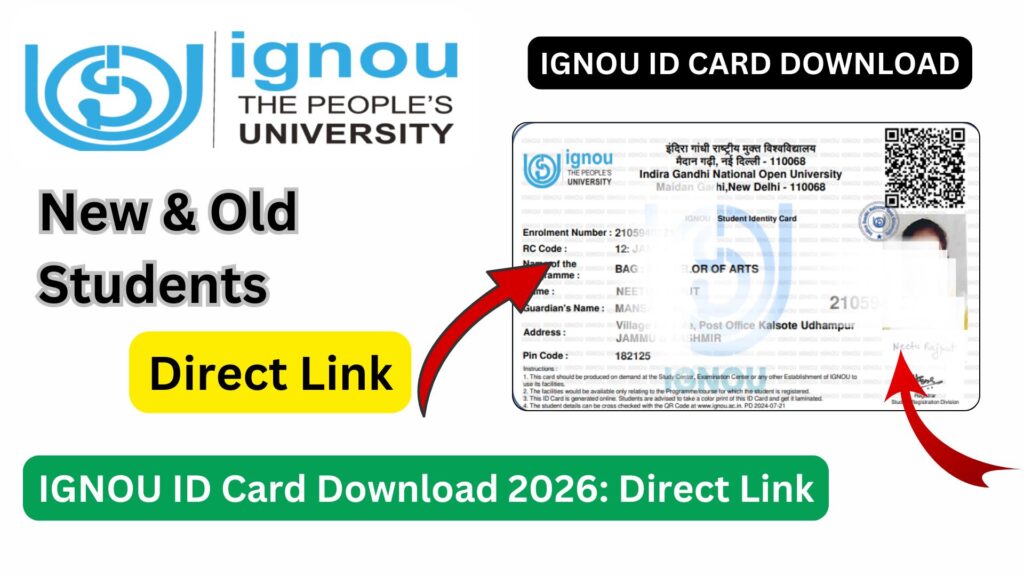
IGNOU ID Card Download: The Indira Gandhi National Open University (IGNOU) is one of the largest open universities in the world, offering flexible and accessible education to millions of learners across India and abroad. Once a student takes admission in any IGNOU program, one of the most important documents they must possess is the IGNOU ID Card.
The IGNOU ID card serves as official proof of a student’s enrollment and is required at various stages of the academic journey, including assignment submission, term-end examinations, practical exams, project viva, and entry into study centers. Despite its importance, many students remain confused about how to download the IGNOU ID card, what to do if it is missing, and whether a digital copy is acceptable.

This detailed guide explains everything related to IGNOU ID Card Download, including eligibility, step-by-step process, common issues, solutions, and FAQs. Whether you are a newly admitted student or a continuing learner, this article will help you understand the process clearly.
What Is an IGNOU ID Card?
The IGNOU ID card is an official identity document issued by the university to confirm that a student is enrolled in a specific program for a particular academic cycle. It contains essential student details such as:
- Student’s name
- Enrollment number
- Program name
- Photograph of the student
- Regional centre details
- Validity period
Earlier, IGNOU used to issue physical ID cards through regional centres. However, the system has now shifted primarily to online ID card download, making it easier for students to access their ID anytime.
Importance of IGNOU ID Card
The IGNOU ID card is not just a formality; it is mandatory for several academic and administrative purposes.
Key Uses of IGNOU ID Card
- Entry into IGNOU examination centres
- Submission of assignments at study centres
- Attending practical exams and workshops
- Appearing for project viva or dissertation evaluation
- Accessing IGNOU regional and study centre services
- Verification during academic counseling sessions
Without a valid IGNOU ID card, students may be denied entry to exam halls or assignment submission counters.
Who Can Download IGNOU ID Card?
The IGNOU ID card download facility is available to:
- Freshly admitted students after confirmation of admission
- Re-registered students continuing the same program
- Students who lost their earlier ID card
- Students who need a duplicate or updated ID card
Once admission is confirmed and enrollment number is generated, students become eligible to download their ID card online.
IGNOU ID Card Download: Important Links and Information
The table below provides quick access to essential information related to IGNOU ID card download.
| Purpose | Link / Details |
|---|---|
| IGNOU ID Card Download Page | https://www.bookhouseadda.com/ignou-id-card-download-with-enrollment-no-2/ |
| Enrollment Number Required | Yes |
| Login Credentials | Enrollment Number + Program |
| Mode of ID Card | Digital (PDF format) |
| Acceptability | Valid for exams and assignments |
| Issuing Authority | Indira Gandhi National Open University |
| Applicable For | All IGNOU Programs |
How to Download IGNOU ID Card Online?
Downloading the IGNOU ID card is a simple process if you follow the correct steps. Below is a detailed, step-by-step guide.
Step 1: Visit the ID Card Download Page
Open the official IGNOU ID card download page using the following link: https://www.bookhouseadda.com/ignou-id-card-download-with-enrollment-no-2/
Step 2: Enter Enrollment Details
You will be required to enter:
- Enrollment Number
- Program Code (for example, BA, MA, BEd, MCom, etc.)
Ensure that the details are entered exactly as provided during admission.
Step 3: Submit the Details
After filling in the required information, click on the submit or proceed button.
Step 4: View IGNOU ID Card
Once the details are verified, your IGNOU ID card will be displayed on the screen.
Step 5: Download and Print
- Download the ID card in PDF format
- Take at least one clear printout
- Laminate the printed copy for long-term use
It is recommended to keep both digital and physical copies safe.
Format of IGNOU ID Card
The IGNOU ID card generally includes the following fields:
- IGNOU logo and university name
- Student photograph
- Name of the student
- Enrollment number
- Program name
- Regional centre code
- Signature space of student
The digital ID card is officially valid and accepted at all IGNOU centres.
Is Digital IGNOU ID Card Valid?
Yes, the digital IGNOU ID card downloaded online is fully valid. IGNOU has officially allowed students to use the downloaded ID card for:
- Term-end examinations
- Assignment submission
- Practical exams
- Project viva
However, students should ensure that the ID card printout is clear and readable.
Common Problems While Downloading IGNOU ID Card
Many students face technical or data-related issues while downloading their ID card. Below are the most common problems and their solutions.
Enrollment Number Not Found
This usually happens if:
- Admission is not yet confirmed
- Enrollment number is entered incorrectly
- Data is not updated in the IGNOU system
Solution: Wait for admission confirmation or verify enrollment details.
Incorrect Program Code
Entering the wrong program code can prevent ID card access.
Solution: Check your admission confirmation letter and use the correct program code.
Website Not Loading
Sometimes the server may be slow due to high traffic.
Solution: Try accessing the website during non-peak hours.
What to Do If You Lose Your IGNOU ID Card?
If you lose your IGNOU ID card, there is no need to panic.
- Simply download the ID card again using the same link
- Take a fresh printout
- Use the digital copy if required urgently
IGNOU does not require students to apply separately for duplicate ID cards if the digital copy is available.
Difference Between IGNOU ID Card and Hall Ticket
Many students confuse the ID card with the hall ticket. Both serve different purposes.
| Aspect | IGNOU ID Card | IGNOU Hall Ticket |
|---|---|---|
| Purpose | Identity Proof | Exam Entry |
| Validity | Throughout Program | Specific Exam Session |
| Issued When | After Admission | Before Exams |
| Mandatory | Yes | Yes |
Students must carry both documents to the examination centre.
Tips to Keep Your IGNOU ID Card Safe
- Store a soft copy on your mobile phone
- Keep a backup on email or cloud storage
- Laminate the printed ID card
- Avoid writing unnecessary marks on the card
- Do not fold or damage the card
IGNOU ID Card for Examination and Assignment Submission
The IGNOU ID card is compulsory for both assignments and exams.
For Assignment Submission
- Many study centres ask for ID verification
- Some centres require ID card copy along with assignments
For Examinations
- Entry to exam hall is not allowed without ID card
- ID card is checked along with hall ticket
FAQ about IGNOU ID Card Download
Is IGNOU ID card compulsory?
Yes, the IGNOU ID card is mandatory for exams, assignments, practicals, and official verification.
Can I appear for exams without IGNOU ID card?
No, most exam centres strictly require the ID card along with the hall ticket.
Is laminated ID card acceptable?
Yes, laminated ID cards are widely accepted and recommended.
Can I download IGNOU ID card without enrollment number?
No, enrollment number is mandatory to download the ID card.
Do I need to renew my IGNOU ID card every year?
No, the same ID card remains valid throughout the duration of the program.
What if my photo is missing on the ID card?
You should contact your regional centre for correction.
Is black and white print allowed?
Yes, but the details must be clearly visible.
Conclusion
The IGNOU ID card is a vital document for every student enrolled at Indira Gandhi National Open University. From assignment submission to examination entry, it plays a crucial role in verifying a student’s identity. With the availability of online ID card download, the process has become simpler and more accessible for learners across the country.
Students are advised to download their IGNOU ID card immediately after admission confirmation and keep both digital and printed copies safe. Any delay or negligence regarding the ID card can lead to unnecessary complications during exams or academic activities.
By following the steps and guidelines explained in this article, students can easily download, use, and manage their IGNOU ID card without confusion.
If you are an IGNOU student and have not downloaded your ID card yet, ensure that you do so at the earliest to avoid last-minute issues.