
IGNOU Project Status: Complete Guide for 2025

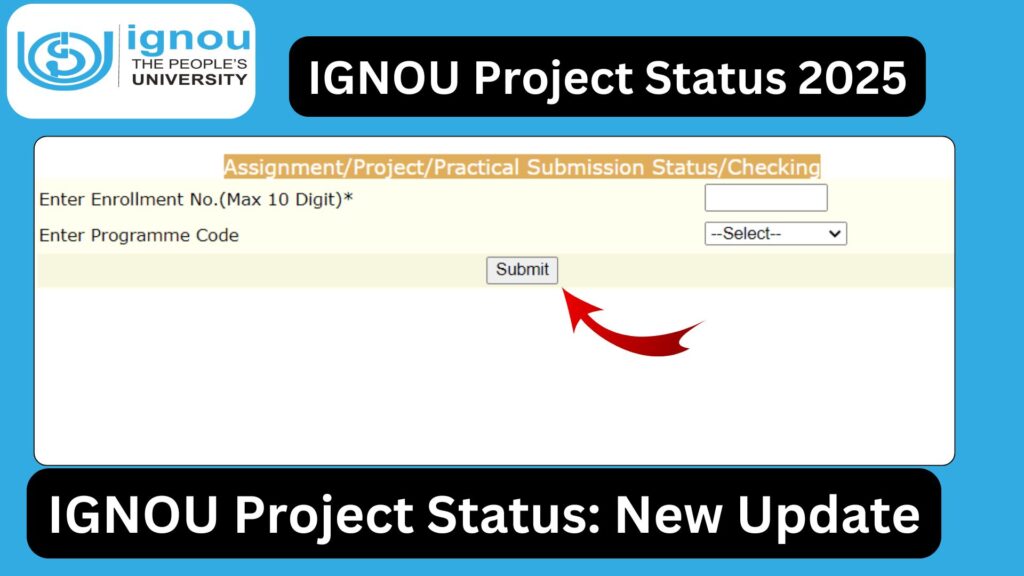
IGNOU Project Status: For many IGNOU students, the project work is one of the most important components of their academic program. Whether you are pursuing a bachelor’s degree, master’s degree, diploma, or certificate course that requires a project, submitting the project on time and checking its status is essential for completing the program successfully.
IGNOU projects carry significant weightage and often determine the final grade or eligibility for the term-end results. Therefore, students must stay updated about their project submission status, evaluation status, and marks.

This article is a detailed guide on IGNOU Project Status 2025, explaining how to check the status, common issues, expected timelines, and important instructions. It also includes the required official link, table of important resources, FAQs, and a complete conclusion.
What is the IGNOU Project Status?
After students submit their projects at the Regional Center or upload them online (if allowed), IGNOU evaluates the project work and updates its status on the official portal. The status helps students know:
- Whether their project has been received
- Whether it has been forwarded for evaluation
- Whether marks have been updated
- Whether it has been approved or needs resubmission
- Whether it is showing in the grade card
The Project Status is an essential indicator for students waiting for their term-end result completion.
Why Checking IGNOU Project Status is Important?
Students must regularly track their project status because:
- Project marks are mandatory for passing certain courses
Courses such as BCA, MCA, MSW, MEG, MAPC, MBA, BAG projects, and many PG diplomas require successful completion of the project. - If your project is not updated, your grade card remains incomplete
Even if your written exams are cleared, IGNOU does not declare you as “completed” until your project marks are uploaded. - Submission mistakes can be corrected in time
Sometimes projects are rejected or sent back due to formatting issues, incomplete certificates, wrong supervisor details, etc. - Students can ensure timely completion before convocation
Without project approval, the student becomes ineligible for the annual convocation.
Where to Check IGNOU Project Status
IGNOU students can check the project status using the official portal.
Official Link to Check IGNOU Project Status
https://isms.ignou.ac.in/changeadmdata/StatusAssignment.asp
This link is used for:
- Project Status
- Practical Status
- Assignment Status
- Marks Updates
All these components are updated under a single system.
Important Links and Information
| Purpose | Link |
|---|---|
| Check IGNOU Project Status | https://isms.ignou.ac.in/changeadmdata/StatusAssignment.asp |
| IGNOU Grade Card | https://gradecard.ignou.ac.in/ |
| IGNOU Previous Year Project Guidelines | https://ignou.ac.in/ |
| IGNOU Student Portal | https://ignou.samarth.edu.in/ |
| Assignment Percentage Calculator | https://www.bookhouseadda.com/ignou-percentage/ |
| Official IGNOU Website | https://ignou.ac.in/ |
How to Check IGNOU Project Status? Step-by-Step Guide
Checking the project status is easy if you follow the correct steps. Below is a detailed process:
Step 1: Visit the Status Portal
Go to: https://isms.ignou.ac.in/changeadmdata/StatusAssignment.asp
This is the official IGNOU portal for checking project and assignment status.
Step 2: Enter Your Enrollment Number
Type your 9 or 10-digit enrollment number exactly as provided at the time of admission.
Step 3: Select the Program Code
Choose your correct program code from the drop-down menu.
Examples include:
- BCA, MCA
- MSW
- MBA
- MAPC
- MAAN
- MEG
- BDP, BAG
- PGDHE, PGDRD
Make sure you select the accurate one.
Step 4: Click on “Submit”
After entering the details, click the Submit button.
Step 5: Check Your Project Status
You will now see the following project-related information:
- Submission received
- Under evaluation
- Completed
- Marks updated
- Not received
- Resubmission required
- Project Rejected
Based on these details, students can take the appropriate actions.
Types of Project Status Updates
IGNOU typically shows different types of project status messages. Here’s what each one means:
1. “Not Received”
This means your project has not been uploaded or processed by the Regional Center yet.
Action:
Contact your regional center with your acknowledgment receipt.
2. “Received – Under Processing”
Your project has been submitted but is pending evaluation.
Action:
Wait for 3 to 8 weeks depending on the workload.
3. “Under Evaluation”
Your project is currently with the evaluator.
Action:
No action needed. Keep checking the status.
4. “Completed – Marks Updated”
Your project has been successfully evaluated and marks are updated.
Action:
Check your grade card for confirmation.
5. “Completed but Marks Not Updated”
Sometimes IGNOU marks take longer to reflect.
Action:
Wait for 7–15 days or contact RC if delayed.
6. “Resubmission Required”
This means your project was rejected due to:
- Incorrect format
- Wrong supervisor credentials
- Missing certificate
- Plagiarism
- Incomplete content
- Unapproved topic
Action:
Resubmit as per the revised instructions from the Regional Center.
7. “Project Rejected”
This is uncommon but may occur due to major issues.
Action:
Consult your study center or regional center immediately.
Why IGNOU Project Marks Take Time to Update?
Sometimes project marks take several weeks or months to appear. This delay happens because of:
- Large number of submissions
- Limited evaluators
- Physical evaluation of projects
- Manual entry in the system
- Cross-verification by regional centers
- University workload during TEE seasons
Students are advised not to panic and keep checking the status regularly.
IGNOU Project Submission Methods
Depending on the program and semester, IGNOU may allow submission in two ways:
1. Offline Submission (Most Common)
Submit a hard copy of the project to your Regional Center:
- Signed by Supervisor
- Properly bound
- With certificate of originality
- Project guide approval letter
- Table of contents
- Index and declaration by student
2. Online Submission (If Enabled)
In some years, IGNOU enables online submission due to special circumstances. Students upload:
- PDF of Project Report
- Scanned Supervisor Certificate
- Declaration Form
After submission, download the acknowledgment.
Documents Required for Project Submission
Students must attach:
- Approved project proposal (if applicable)
- Certificate of originality
- Supervisor approval
- Declaration by student
- Index and table of contents
- Properly typed and bound project
- Student signature
Improper documentation may lead to the project being rejected.
How to Ensure Your Project is Accepted Without Issues?
Follow these guidelines:
- Use A4 white sheets
- Maintain proper formatting (1.5 spacing, Times New Roman 12-point)
- Do not copy content from the internet
- Give proper references
- Choose an authorized IGNOU supervisor
- Submit before the deadline
- Save a photocopy of the project
- Get an acknowledgment slip
Students who follow these steps rarely face rejection.
How to Confirm if Your Project Marks are in the Grade Card?
After project status shows “Completed,” visit:
Enter:
- Enrollment Number
- Program Code
Check if marks appear in the grade card.
If not, wait 7–15 days or contact the evaluation center.
Common Issues Students Face with IGNOU Project Status
Below are the most common concerns and solutions.
1. Status Not Updating for Months
This usually happens due to evaluation delays.
Solution:
Contact your RC or wait for the next update cycle.
2. Status Showing Wrong Enrollment Number
This occurs when wrong details are entered.
Solution:
Re-enter correct enrollment number.
3. Project Submitted but Status Shows “Not Received”
Regional center may not have uploaded the data yet.
Solution:
Visit the RC with the acknowledgment slip.
4. Marks Updated but Not Shown in Grade Card
It may take a few days to reflect.
Solution:
Wait for the next grade card update cycle.
5. Project marked as “Rejected”
May occur due to plagiarism or missing documents.
Solution:
Prepare a new project and resubmit.
Who Evaluates IGNOU Projects?
Projects are evaluated by:
- Academic counselors
- Course-specific experts
- Regional center-appointed supervisors
- Internal IGNOU faculty
They check for:
- Originality
- Content quality
- Relevance
- Research methodology
- Presentation
How Long Does IGNOU Take to Update Project Marks?
Generally, IGNOU takes:
- 4 to 8 weeks after submission
- Sometimes 10 to 12 weeks during TEE season
Students must keep checking the status regularly.
FAQ about IGNOU Project Status 2025
What is the official link to check IGNOU Project Status?
You can check your project status at:
https://isms.ignou.ac.in/changeadmdata/StatusAssignment.asp
How long does it take for IGNOU to evaluate projects?
Evaluation usually takes between 4 to 12 weeks.
My project status says “Not Received.” What should I do?
Contact your Regional Center with the submission acknowledgment.
Does IGNOU allow online project submission?
It depends on the session. Mostly projects are submitted offline.
What if my project is rejected?
You must correct the issues and resubmit the project as per instructions.
Can I check project marks in the grade card?
Yes. Once evaluated, marks appear in the grade card.
Is Project Viva mandatory?
Some programs like MAPC and MSW may require viva voce.
How can I contact IGNOU if my status is not updated?
Visit or email your Regional or Study Center.
Do I need my supervisor’s signature?
Yes. Projects without supervisor signatures are rejected.
Can I submit my project at the Study Center?
No. Projects must be submitted only at the Regional Center.
Conclusion
IGNOU Project Status is a crucial part of completing your program successfully. The status helps students track whether their project has been received, evaluated, approved, or requires correction. With thousands of project submissions across IGNOU’s vast network of students, delays are natural, but checking your status regularly ensures smooth progress.
The official link for checking the status is: https://isms.ignou.ac.in/changeadmdata/StatusAssignment.asp
Students should make sure they follow proper submission guidelines, keep copies of all documents, and wait patiently for evaluation updates. By staying informed and proactive, students can avoid unnecessary delays and complete their academic program on time.