
Samarth Portal IGNOU: Complete Guide 2025 to Login, Registration, Admission, Hall Ticket, Assignment Status and More

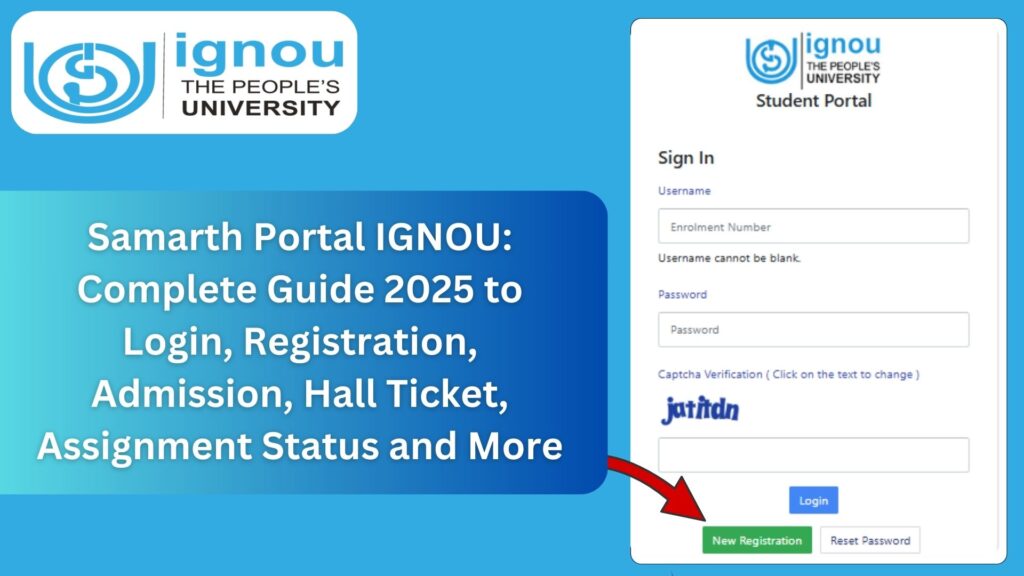
Samarth Portal IGNOU: The Indira Gandhi National Open University (IGNOU) has modernised its entire digital ecosystem through the Samarth Portal, a unified online platform designed to provide students with seamless access to academic services. Whether you want to apply for admission, download your hall ticket, check assignment status, edit your profile, download study materials, or make fee payments, the IGNOU Samarth Portal is the central gateway for all student-related activities.
Developed under the Ministry of Education’s Samarth e-Governance initiative, the portal aims to improve transparency, streamline student workflows, and make IGNOU services easily accessible from anywhere. In this detailed guide, you will learn everything about the Samarth Portal IGNOU, including features, login steps, registration instructions, services offered, troubleshooting support, FAQs, and more.

You can access the IGNOU Samarth Portal directly from this link: https://ignou.samarth.edu.in/
What Is the IGNOU Samarth Portal?
The IGNOU Samarth Portal is the official online system where students can manage their academic journey. It combines multiple services such as admission, re-registration, hall tickets, assignment status, project submission, grade card, and examination form—all in one place.
This platform is vital for all IGNOU students because it eliminates paperwork, reduces delays, and ensures accurate academic records. Whether you are a new applicant or a continuing student, the Samarth Portal is essential for managing your IGNOU profile.
Importance of Samarth Portal for IGNOU Students
The Samarth Portal plays a transformative role in the digital management of IGNOU academic operations. Some key reasons for its importance are:
1. Centralized Academic Dashboard
Students can access all services, updates, and documents from one portal.
2. Hassle-Free Admission Process
The entire admission and re-registration process is available online without visiting any centre.
3. Real-Time Status Tracking
Students can track the status of:
- Admission
- Fee payments
- Assignment submissions
- Project submissions
- Grade card updates
- Exam forms
4. Transparency and Accuracy
The automated system reduces errors and ensures timely updates.
5. Online Document Access
Students can download their:
- Hall ticket
- Admit card
- ID card
- Assignment question papers
- Study materials
6. Student-Friendly Design
The portal is designed to be accessible for beginners, making navigation easy.
Samarth Portal Login Link
Students can access the portal using the official link below:
Access IGNOU Samarth Portal
Bookmark this link for regular login.
Important Links and Information
Below is a structured table containing important IGNOU resources connected with the Samarth system:
| Service | Link / Information |
|---|---|
| IGNOU Samarth Portal | https://ignou.samarth.edu.in/ |
| IGNOU Admission Login | https://ignouadmission.samarth.edu.in/ |
| Hall Ticket / Admit Card | https://ignou.samarth.edu.in/ |
| Assignment Status | https://isms.ignou.ac.in/changeadmdata/StatusAssignment.asp |
| Grade Card | https://gradecard.ignou.ac.in/gradecard/ |
| Exam Form Submission | https://exam.ignou.ac.in/ |
| Admission Portal (New Students) | https://ignouadmission.samarth.edu.in/ |
| Re-Registration Portal | https://onlinerr.ignou.ac.in/ |
| Student Management System | https://ignou.samarth.edu.in/ |
| Previous Year Question Papers | https://webservices.ignou.ac.in/pre-question/ |
Features of the IGNOU Samarth Portal
The Samarth portal is packed with essential features. Here is what it offers:
1. New Admission and Student Registration
New students can apply for fresh admission to any program through Samarth.
2. Re-Registration for Next Year/Semester
Existing learners can re-register without visiting their regional centre.
3. Download Admit Card / Hall Ticket
Hall tickets for TEE exams are issued through Samarth.
4. Student ID Card Download
Students can download their digital ID card anytime.
5. Assignment Submission and Status Tracking
Students can check whether their assignments are received, evaluated, or pending.
6. Fee Payment and Receipt Download
Fee receipts are automatically generated after payment.
7. Profile Update and Correction
Students can edit their personal profile, address, email, etc.
8. Online Project/Practical Submission
Many programs allow uploading soft copies of project reports.
9. Grade Card and Marksheet Access
Students can check their assignment marks, theory marks, and final grade card.
10. Examination Form Submission
Term-End Examination forms can be submitted online via the portal.
How to Login into IGNOU Samarth Portal?
Follow these steps to log in to the IGNOU Samarth Portal:
1. Visit the portal
Go to: https://ignou.samarth.edu.in/
2. Enter Your Login Credentials
- Username (Enrollment Number)
- Password
3. Enter the Captcha
Type the characters shown in the image.
4. Click on Login Button
You will now access the student dashboard.
How to Register? (For New Students)
If you have never logged into the Samarth portal, follow these steps:
Step 1: Visit the portal
Step 2: Click on “New Registration”
Located on the login page.
Step 3: Fill the Registration Form
Provide:
- Name
- Mobile number
- Email ID
- Program
- Password
Step 4: Verify Email and Mobile
You will receive OTPs for verification.
Step 5: Complete Profile
Add personal and academic details.
Step 6: Submit
Your student profile will be created.
Services Available on IGNOU Samarth Dashboard
Once logged in, the dashboard provides:
1. Admission Details
View admission status, program details, session, and study centre.
2. Assignment Tab
Upload assignments (where applicable) and track their status.
3. Examination Section
Submit exam forms, view exam dates, and download hall tickets.
4. Fee Payment Tab
Make payments and download receipts.
5. Profile Management
Edit address, phone number, and other details.
6. Courses and Study Materials
Access digital study materials and eGyankosh.
7. Downloadable Documents
- ID card
- Hall ticket
- Admission confirmation
- Assignment PDFs
How to Download IGNOU Hall Ticket from Samarth Portal?
Follow the steps below:
- Go to https://ignou.samarth.edu.in/
- Login with your credentials
- Click on “Hall Ticket/Admit Card” tab
- Select the examination
- Click on “Download”
Your PDF hall ticket will be displayed for printing.
How to Check Assignment Status on Samarth Portal?
IGNOU does not display assignment status directly on Samarth, but students can check status from the official link:
https://isms.ignou.ac.in/changeadmdata/StatusAssignment.asp
Steps:
- Enter Enrollment Number
- Select Program
- Click Submit
- View marks and status
How to Submit Assignments through Samarth Portal? (If Enabled)
Some regional centres allow online submission.
Steps:
- Login to Samarth
- Go to Assignment section
- Upload scanned PDF of each assignment
- Ensure the front page is attached
- Submit
Follow guidelines provided by your regional centre.
How to Check Admission Status on Samarth Portal?
After applying for admission:
- Login to Samarth
- Click on Admission Status
- View application progress
- Download confirmation document
Admission status is updated within a few days after verification.
How to Recover Password on Samarth Portal?
If you forget your password:
- Go to login page
- Click on “Forgot Password”
- Enter Enrollment Number
- Provide registered email and mobile
- Receive OTP
- Create a new password
Common Errors on Samarth Portal and Their Solutions
1. Invalid Login Credentials
Solution: Reset password or ensure enrollment number is correct.
2. Captcha Not Loading
Solution: Refresh page or clear browser cache.
3. Page Not Opening
Solution: Try a different browser.
4. Payment Not Reflecting
Solution: Wait 24 hours and check again.
5. Hall Ticket Not Available
Solution: Check if the exam form is submitted successfully.
Benefits of the IGNOU Samarth Portal
1. Faster Processing
Reduces delays in admissions and exams.
2. No Physical Visit Needed
Everything can be managed online.
3. Accuracy and Transparency
Reduces errors in marks and records.
4. Student-Friendly Interface
Easy to navigate for all age groups.
5. 24/7 Online Availability
Access from anywhere and anytime.
Tips for Using Samarth Portal Efficiently
- Always use the latest browser.
- Save your login credentials safely.
- Frequently check dashboard notifications.
- Download important documents and keep backups.
- Submit assignments and exam forms before deadlines.
- Keep email and mobile number updated.
FAQ about Samarth Portal IGNOU
What is the IGNOU Samarth Portal?
It is an online student management system that provides admission, hall ticket, and academic services.
What is the link to access the Samarth Portal?
You can access it here:
https://ignou.samarth.edu.in/
Can I download my ID card from Samarth Portal?
Yes, digital ID cards are available.
Is Samarth used for assignments?
Some regional centres allow uploading assignments via Samarth, but many use separate portals.
How can I check my assignment status?
How can I download my hall ticket?
Login to Samarth and go to the Hall Ticket tab.
What if the Samarth portal is not opening?
Try clearing your cache or opening it in a different browser.
Is Samarth used for both admission and exam forms?
Yes, it handles admissions and exam-related activities.
Can I update my mobile number and address on Samarth?
Yes, through the profile section.
Is Samarth mandatory for all IGNOU students?
Yes, all students must use Samarth for academic management.
Conclusion
The Samarth Portal IGNOU is an essential digital platform for every student enrolled at the Indira Gandhi National Open University. It simplifies academic management by centralising all important services such as admission, hall ticket download, assignment tracking, project submission, grade access, re-registration, and fee payments. With its user-friendly design and transparent functioning, it ensures smooth communication between students and the university.
To access the Samarth Portal, use the official link: https://ignou.samarth.edu.in/
This comprehensive guide covers everything a new or existing student needs to know about the portal—from login and registration to troubleshooting and important links. By using the portal effectively, students can save time, avoid confusion, and ensure timely academic progress.