
IGNOU ID Card Download 2026: Complete Guide to Download IGNOU Student ID Card Online

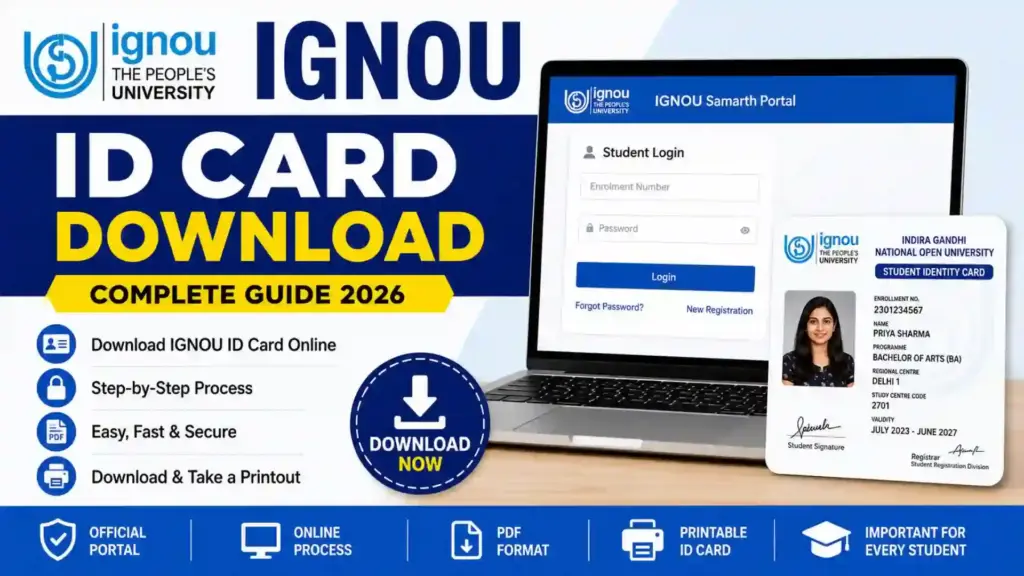
IGNOU ID Card Download 2026: The IGNOU ID card is one of the most important documents for every student enrolled in Indira Gandhi National Open University. Whether you are pursuing a certificate, diploma, undergraduate, postgraduate, or professional course, carrying your IGNOU ID card is mandatory for academic activities. Students often search for the process of IGNOU ID card download after admission confirmation because the ID card acts as an official identity proof throughout the academic session.
In this detailed guide, you will learn everything about IGNOU ID card download, including the step-by-step process, eligibility, login procedure, common issues, benefits of the ID card, and solutions to frequently faced problems.

Students can download their IGNOU ID card online through the official Samarth portal using their enrollment credentials.
IGNOU ID Card Download Link: IGNOU ID Card Download Portal
What is the IGNOU ID Card?
The IGNOU ID card is an official student identification document issued by Indira Gandhi National Open University after successful admission confirmation. It contains important details related to the student and academic program.
The ID card generally includes:
- Student Name
- Enrollment Number
- Program Name
- Regional Centre
- Study Centre
- Student Photograph
- Signature
- Session Details
- University Information
The ID card is required for multiple academic purposes such as:
- Entering examination centers
- Submitting assignments
- Attending practical sessions
- Visiting study centers
- Using library services
- Appearing in term-end examinations
- Participating in university activities
Without the ID card, students may face difficulties during examinations and other university-related processes.
IGNOU ID Card Download 2026 Overview
| Particulars | Details |
|---|---|
| University Name | Indira Gandhi National Open University |
| Article Topic | IGNOU ID Card Download |
| Mode of Download | Online |
| Official Portal | Samarth Portal |
| Login Required | Yes |
| Credentials Needed | Enrollment Number and Password |
| ID Card Format | |
| Printable | Yes |
| Official Download Link | https://ignou.samarth.edu.in/index.php/site/login |
Important Links for IGNOU ID Card Download
| Purpose | Link |
|---|---|
| IGNOU ID Card Download Portal | https://ignou.samarth.edu.in/index.php/site/login |
| IGNOU Official Website | https://www.ignou.ac.in |
| Admission Portal | https://ignouadmission.samarth.edu.in |
| Assignment Submission Information | https://www.ignou.ac.in |
| Grade Card Portal | https://gradecard.ignou.ac.in |
Who Can Download the IGNOU ID Card?
Students who have successfully completed the admission process and received confirmation from IGNOU can download their ID card online.
The following students are eligible:
- Fresh admission students
- Re-registered students
- Undergraduate students
- Postgraduate students
- Diploma students
- Certificate course students
- Distance learning students
- Online program students
However, students must ensure that their admission status has been confirmed before attempting the IGNOU ID card download process.
IGNOU ID Card Download Process Step-by-Step
Students can easily download their IGNOU ID card from the official Samarth portal. Follow the steps carefully.
Step 1: Visit the Official Portal
Open the official IGNOU Samarth login portal using this link:
Step 2: Enter Login Credentials
You need to enter:
- Enrollment Number
- Password
After entering the details, click on the “Login” button.
Step 3: Open Student Dashboard
Once logged in successfully, your student dashboard will appear on the screen.
You will find various options related to your admission and academic records.
Step 4: Locate the ID Card Option
Look for the “ID Card” section or “Download ID Card” option on the dashboard.
Click on it.
Step 5: Download the PDF
Your IGNOU ID card will open in PDF format.
Click on the download button to save the file on your device.
Step 6: Print the ID Card
After downloading the PDF:
- Take a clear printout
- Use A4-size paper
- Keep multiple copies for future use
Students are advised to laminate the printed copy for protection.
Details Mentioned on IGNOU ID Card
After the IGNOU ID card download process, students should verify all details carefully.
The ID card usually contains:
| Details Available on ID Card |
|---|
| Student Name |
| Enrollment Number |
| Program Code |
| Regional Centre |
| Study Centre Code |
| Session |
| Student Photograph |
| Student Signature |
| Validity Information |
If any information is incorrect, students should immediately contact their regional center.
Why is IGNOU ID Card Important?
The IGNOU ID card is not just an identity document. It is mandatory for several university activities.
1. Examination Entry
Students must carry the ID card during term-end examinations. Without it, entry may be denied.
2. Assignment Submission
Some study centers ask students to show their ID card during assignment submission.
3. Library Access
Students can access IGNOU library facilities using the ID card.
4. Practical Sessions
For practical examinations and lab sessions, carrying the ID card is compulsory.
5. Student Verification
The ID card acts as official proof of enrollment at IGNOU.
Common Problems During IGNOU ID Card Download
Many students face issues while downloading their IGNOU ID card. Below are common problems and their solutions.
1. Invalid Login Credentials
Reason
Incorrect enrollment number or password.
Solution
- Recheck credentials carefully
- Reset password if required
- Use correct enrollment number
2. Admission Not Confirmed
Reason
The admission process is still under verification.
Solution
Wait for admission confirmation from IGNOU before downloading the ID card.
3. Website Not Opening
Reason
Heavy traffic on the portal.
Solution
- Try during non-peak hours
- Use a stable internet connection
- Clear browser cache
4. PDF Not Downloading
Reason
Browser restrictions or slow internet.
Solution
- Try another browser
- Enable PDF downloads
- Refresh the page
5. Incorrect Details on ID Card
Reason
Errors during admission form submission.
Solution
Contact your regional center immediately for corrections.
How to Recover IGNOU Samarth Password?
Students often forget their login password. IGNOU provides a password recovery option.
Steps to Reset Password
- Open the Samarth login portal
- Click on “Forgot Password”
- Enter registered email or enrollment number
- Verify OTP or email link
- Create a new password
- Login again
After resetting the password, students can continue the IGNOU ID card download process.
IGNOU ID Card Download for Fresh Admission Students
Fresh admission students may not find their ID card immediately after registration.
Usually:
- Admission verification takes time
- Enrollment generation may require several days
- ID cards become available after confirmation
Students should regularly check their admission status and dashboard.
IGNOU Digital ID Card vs Printed ID Card
IGNOU students can use both digital and printed versions of the ID card.
| Digital ID Card | Printed ID Card |
|---|---|
| Stored on mobile | Physical hard copy |
| Easy to access | Useful during exams |
| PDF format | Laminated copy preferred |
| Can be downloaded anytime | Must be printed |
Students are advised to keep both versions available.
Can Students Use Mobile ID Card During Exams?
In most cases, IGNOU examination centers prefer a printed copy of the ID card.
Although some centers may accept digital copies, students should always carry:
- Printed ID card
- Hall ticket
- Valid government ID proof
This avoids unnecessary problems at examination centers.
Tips for Safe IGNOU ID Card Usage
Students should follow these safety tips:
- Keep multiple printed copies
- Save PDF on phone and email
- Avoid sharing login credentials
- Verify details after download
- Laminate the printed copy
- Keep the ID card safe until course completion
IGNOU ID Card Download for Re-Registered Students
Students who continue into the next semester or year through re-registration can also access their ID cards through the same portal.
Usually:
- Existing login credentials remain active
- Updated session details may appear
- Students should download the latest version if changes occur
Difference Between Enrollment Number and ID Card
Many students confuse enrollment number with the ID card.
| Enrollment Number | IGNOU ID Card |
|---|---|
| Unique student number | Official identity document |
| Used for login | Used for verification |
| Numeric code | PDF card with details |
| Permanent | Downloadable document |
Both are equally important for students.
Documents Required for IGNOU ID Card Download
Generally, no additional documents are required after login. However, students should have:
- Enrollment number
- Registered mobile number
- Password
- Internet connection
- PDF reader
How Long is the IGNOU ID Card Valid?
The ID card remains valid throughout the duration of the academic program.
Students should retain it until:
- Course completion
- Final results
- Degree collection
- Migration certificate process
What to Do If IGNOU ID Card is Lost?
If you lose the printed copy:
- Login again to the Samarth portal
- Download the PDF
- Print another copy
If login access is unavailable, reset the password first.
IGNOU ID Card Download on Mobile Phone
Students can also complete the IGNOU ID card download process on smartphones.
Steps
- Open browser
- Visit Samarth portal
- Login using credentials
- Open ID card section
- Download PDF
- Save file on device
Using Chrome or Firefox browsers generally provides better compatibility.
Benefits of Online IGNOU ID Card Download
The online system provides several advantages:
- Instant access
- No need to visit regional centers
- Easy re-download option
- Digital storage
- Faster student services
- Paperless process
This online facility has simplified the student verification process significantly.
Important Instructions for IGNOU Students
Students should remember the following instructions:
- Always use official IGNOU portals
- Do not share passwords with anyone
- Keep credentials secure
- Download the ID card immediately after activation
- Verify details carefully
- Contact support for corrections
FAQ about IGNOU ID Card Download 2026
What is the official link for IGNOU ID card download?
Students can download their ID card from the official portal:
IGNOU ID Card Download Portal
Can I download the IGNOU ID card without enrollment number?
No, the enrollment number is mandatory for login and ID card download.
Is the IGNOU ID card compulsory for exams?
Yes, students must carry the ID card during examinations.
What should I do if my ID card is not showing?
Wait for admission confirmation or contact your regional center.
Can I use a digital copy of the ID card?
Some centers may accept it, but carrying a printed copy is recommended.
How can I correct mistakes on the ID card?
Students should contact their regional center for correction requests.
Is the IGNOU ID card available immediately after admission?
No, it becomes available after admission verification and confirmation.
Can old students download the ID card again?
Yes, students can re-download the ID card anytime through the portal.
Which browser is best for IGNOU ID card download?
Google Chrome and Mozilla Firefox generally work well.
Is there any fee for IGNOU ID card download?
No, downloading the ID card is completely free.
Conclusion
The IGNOU ID card download process is simple and fully online through the Samarth portal. Every IGNOU student should download and print the ID card immediately after admission confirmation because it is one of the most important academic documents issued by the university.
The ID card is essential for examinations, assignments, practical sessions, library access, and student verification. Students should always keep both digital and printed copies secure throughout the duration of their academic program.
If you face any issue during the IGNOU ID card download process, carefully verify your login credentials, admission status, and internet connection. Most problems can be resolved easily through the official portal or by contacting the regional center.
Students can access the official ID card download portal here: